


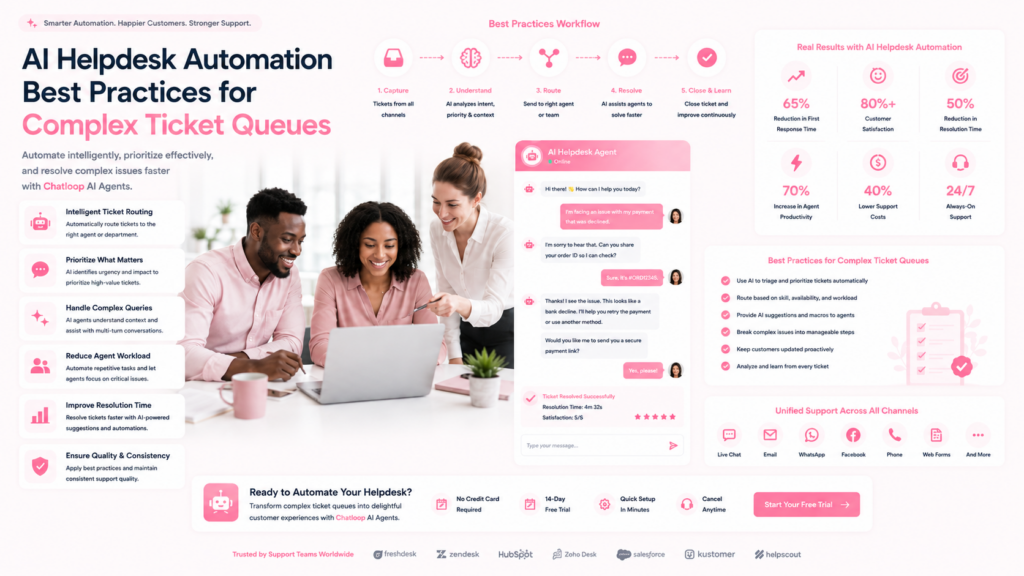
Most helpdesk automation guides focus on the easy wins: automating FAQs, sending acknowledgment emails, deflecting password reset requests. Those are valuable — but they leave the hard problem untouched. What happens when a ticket involves a billing dispute that also has a technical component and an account escalation? What happens when a high-value customer submits a vague complaint that requires investigation before anyone can even classify it?
Complex ticket queues are where AI automation either proves itself or fails. This guide focuses specifically on those hard cases — the multi-faceted, ambiguous, high-stakes tickets that require more than simple intent classification to route and resolve correctly. These best practices come from implementations across SaaS, ecommerce, financial services, and enterprise support operations where ticket complexity is a real daily challenge.
Why Complex Tickets Resist Simple Automation
Before addressing best practices, it helps to understand why complex tickets are difficult. They share several characteristics that defeat basic automation:
Multi-intent: A single ticket may contain a complaint, a billing question, and a technical issue simultaneously. Simple intent classifiers pick one and misroute the rest.
Ambiguous language: Frustrated customers often describe symptoms rather than problems. "Everything is broken" tells you very little about what needs fixing.
Implicit context dependency: Resolving the ticket requires understanding account history, prior interactions, and contract details that aren't in the ticket itself.
Emotion-sensitivity: High-frustration tickets require different handling than neutral inquiries. Routing an angry enterprise customer to a low-priority queue because the AI classified the issue as "general inquiry" is a relationship-damaging error.
SLA complexity: Different customers have different SLA entitlements. The same ticket from a free-tier user and an enterprise customer requires different priority and response time despite identical content.
Simple automation — keyword matching, single-intent classification, rule-based routing — fails on all these dimensions. The best practices below address each one.
Best Practice 1: Multi-Label Intent Classification
Move away from single-label classification (assigning each ticket to one intent category) toward multi-label classification (identifying all intents present in a ticket simultaneously).
Implementation approach: Train your classification model on historical tickets labeled with all present intents, not just the primary one. A ticket about a billing charge that also references a technical glitch should be labeled [billing, technical] — and routed or handled accordingly.
Routing implications of multi-label classification:
- A [billing, technical] ticket routes to a specialist who handles both, or triggers a coordinated response from two queues
- A [complaint, escalation] ticket triggers priority routing regardless of the specific issue content
- A [general, unclear] label triggers an AI clarification request before routing
Training data requirements: Multi-label classification models need historical tickets with complete intent labels. If your historical data only has single-label classifications, plan a labeling project to retroactively tag your most recent 500-1000 tickets accurately before training. This investment pays off in routing accuracy.
Best Practice 2: Pre-Triage Data Enrichment
Before any routing or response decision, the AI should automatically pull context from every available data source. A ticket submitted without context is half a ticket. With enrichment, it becomes a complete picture.
Enrichment data sources for helpdesk tickets:
- CRM: Customer name, account tier, contract value, assigned account manager, previous resolution notes
- Subscription/billing system: Current plan, payment status, outstanding invoices, subscription age
- Product usage data: Last login, features used, error logs, usage volume in the last 30 days
- Previous ticket history: All prior tickets, resolution outcomes, recurrence patterns
- SLA entitlements: Response time and resolution time guarantees by customer tier
With this data, a vague ticket becomes interpretable. "Everything is broken" from an enterprise customer who hasn't logged in for 3 days and has an upcoming renewal in 14 days is a high-priority retention risk, not a routine support issue.
Implementation note: Pre-triage enrichment requires real-time API connections to your source systems. This is a non-trivial integration but the single most impactful change you can make to routing accuracy for complex tickets.
Best Practice 3: Priority Scoring Over Priority Labels
Most helpdesks assign simple priority labels: Low, Medium, High, Urgent. This is too coarse for complex queue management. Replace labels with a numeric priority score (1-100) calculated from multiple weighted factors.
Priority score factors for complex queues:
| Factor | Weight | Rationale |
|---|---|---|
| Customer tier (enterprise/mid/SMB/free) | 25% | Revenue impact |
| Days until renewal | 15% | Retention risk window |
| Sentiment score of ticket content | 15% | Escalation risk |
| Number of prior unresolved tickets | 10% | Compounding frustration |
| SLA breach risk (time to SLA threshold) | 20% | Contractual obligation |
| Issue severity classification | 15% | Business impact |
A numeric score enables more granular queue ordering and dynamic reprioritization. A ticket that scores 62 at submission may rescore to 88 four hours later because its SLA breach risk increased. Static labels can't reflect this dynamic.
Queue visualization: Display the live priority score next to each ticket in your helpdesk interface so agents see the full picture, not just an Urgent/High/Medium label. Agents who understand why a ticket is prioritized highly handle it more thoughtfully.
Best Practice 4: Structured Clarification Before Routing
For tickets flagged as [unclear] or [multi-intent], don't route them prematurely. Route too early and you send the ticket to the wrong queue, frustrating the customer and wasting agent time. Instead, trigger an AI-powered clarification request.
How to design effective clarification requests:
Keep them short — one or two questions maximum. Multiple questions feel like a survey and reduce response rates significantly.
Make them specific to the content already in the ticket. "Could you help us understand whether this is more of a billing question or a technical issue?" is more useful than "Could you tell us more about your issue?"
Use structured response options where possible. Dropdown menus or button options in chat interfaces produce faster, cleaner responses than free text.
Set a clear timeline expectation. "Once you respond, we'll have your ticket with the right specialist within 15 minutes."
Handling non-response: If the customer doesn't respond to the clarification request within 2 hours, the AI should make a best-effort routing decision based on available signals and log the uncertainty flag for the receiving agent. Don't let unresolved clarification requests create queue stagnation.
Best Practice 5: AI Agent Assist for Complex Resolution
AI can't always resolve a complex ticket autonomously — but it can dramatically accelerate human agent resolution. This is the agent assist model: AI works alongside human agents rather than replacing them.
Agent assist capabilities that matter for complex tickets:
Context summary: When an agent opens a ticket, the AI provides a 3-5 sentence summary of the customer context, issue history, and key account details — so agents don't spend 10 minutes reading through CRM notes before typing a single word.
Suggested responses: The AI drafts a response based on the ticket content and knowledge base, which the agent edits and sends rather than writing from scratch. For well-trained knowledge bases, agents accept AI draft responses with minor edits 60-70% of the time.
Knowledge base retrieval: As the agent types or reads the ticket, the AI surfaces relevant knowledge base articles, past ticket resolutions for similar issues, and macros in real time. Agents stop having to remember or search — the right information appears contextually.
Tone alerts: For high-frustration tickets, the AI flags if the agent's draft response uses language likely to escalate rather than de-escalate. Simple sentiment analysis of the outgoing draft catches tone mismatches before they're sent.
Next action prompts: After the agent sends a response, the AI suggests logical next steps — follow-up timer, escalation consideration, related ticket linking — based on issue type and resolution patterns.
Productivity impact: Teams implementing agent assist report 25-40% reduction in average handle time for complex tickets, with first-contact resolution rates improving 15-20 percentage points. Agents solve more tickets per shift without working harder — they just start each ticket better prepared.
Best Practice 6: Escalation Rule Design for Complex Queues
Escalation logic is where most helpdesk automation implementations underinvest. They configure obvious rules (VIP customer + urgent issue = escalate) and miss the patterns that actually create risk.
Escalation triggers to configure beyond the obvious:
Recurrence escalation: If a customer submits their third ticket about the same underlying issue within 30 days, auto-escalate regardless of individual ticket priority. Recurrence means the resolution attempts haven't worked — this needs senior attention.
Sentiment degradation: If a customer's sentiment across their last three tickets has declined each time, flag the account for proactive outreach before the next ticket arrives.
Silent churn signal: If a high-value customer has gone from 5+ logins/week to zero logins in the last 10 days AND has an open ticket, escalate immediately. This is a churn signal combined with an unresolved frustration.
Cross-product blast radius: If a technical issue affects multiple customers simultaneously (same error code appearing in 10+ tickets within 60 minutes), auto-escalate to engineering and create a mass communication ticket. Don't let individual agents handle the same incident repeatedly without coordination.
Pre-renewal window: Any complaint or negative ticket from a customer within 30 days of contract renewal receives elevated priority, regardless of issue severity. Renewals are fragile — unresolved issues in this window drive churn.
Best Practice 7: Queue Management for Peak Periods
Complex ticket queues suffer most during volume spikes — product incidents, seasonal peaks, marketing campaign launches. Static queue configurations collapse. AI queue management maintains performance dynamically.
Dynamic queue management techniques:
Real-time capacity monitoring: Track the ratio of open tickets to available agent capacity. When the ratio exceeds a defined threshold, trigger queue management protocols automatically.
Priority-based triage during overflow: When the queue overflows, don't process in order of arrival. Reprocess the entire queue by current priority score and serve the highest-priority tickets first, regardless of when they were submitted.
Skill-based overflow routing: When a specialist queue overflows (e.g., billing specialists are at capacity), route lower-complexity billing tickets to general agents with a knowledge base assist flag, reserving specialist capacity for high-complexity cases only.
Customer communication automation: During overflow, the AI automatically sends status updates to customers with longer-than-normal wait times. Proactive communication during delays reduces follow-up tickets by 30-50% and maintains satisfaction scores even when response times slip.
Surge playbooks: Pre-build queue management configurations for known surge events (Black Friday, product launch day, scheduled maintenance windows). Activate them with a single toggle rather than manually reconfiguring rules during the surge itself.
Best Practice 8: Knowledge Base Design for AI-Powered Resolution
The quality of your AI's responses — whether automated or agent-assisted — depends entirely on your knowledge base. Complex tickets expose knowledge base gaps immediately.
Knowledge base design principles for complex queues:
Structured over free-text: Organize articles with consistent structures (problem statement, cause, resolution steps, escalation path) rather than free-form prose. AI retrieval accuracy improves significantly with structured content.
Outcome-tagged articles: Tag each article with the resolution outcomes it supports. "This article resolves: billing charge dispute, double-charge complaint, invoice correction request." These tags help the AI retrieve articles based on issue outcome, not just keyword overlap.
Escalation path documentation: Every knowledge base article for a complex issue type should include explicit escalation criteria — when this article isn't sufficient, the next step is X. This gives agents and AI clear decision points.
Decay management: Set review dates on every article. Complex issue resolutions change as products evolve. Knowledge base articles with outdated resolution steps cause more harm than having no article at all.
Gap identification: Review all tickets where agents marked "no relevant KB article found" weekly. These gaps represent systematic automation blind spots. Filling them accelerates future resolution rates.
Measuring AI Helpdesk Performance on Complex Tickets
Don't evaluate AI helpdesk performance on total ticket volume alone — measure specifically on complex ticket categories where the stakes are highest.
| Metric | Target (Complex Tickets) | Measurement Method |
|---|---|---|
| First Contact Resolution Rate | 55-65% | Tickets closed without follow-up / Total tickets |
| Average Handle Time | 15-20 min reduction vs baseline | Per-ticket handle time tracking |
| Escalation Rate | Under 15% | Escalated tickets / Total complex tickets |
| SLA Compliance Rate | 95%+ | Tickets resolved within SLA / Total SLA-bound tickets |
| Agent Assist Adoption Rate | 70%+ | Agents using AI suggestions / Total agents |
| Priority Scoring Accuracy | 85%+ | Validated by manager review sampling |
| Knowledge Base Hit Rate | 80%+ | Tickets where relevant article was retrieved |
Frequently Asked Questions
How does AI handle complex helpdesk tickets that involve multiple issues?
Advanced AI helpdesk systems use multi-label intent classification to identify all issue types present in a single ticket simultaneously. Rather than picking one intent and routing to a single queue, the system flags all present intents, enriches the ticket with account context, assigns a composite priority score, and either routes to a specialist handling multiple issue types or coordinates a split-ticket workflow where appropriate.
What is AI ticket triage, and how is it different from basic sorting?
Basic ticket sorting assigns tickets to queues based on simple rules (email subject line keywords, form field selections). AI ticket triage uses natural language understanding to classify ticket content, pull contextual enrichment from connected systems, score priority based on multiple weighted factors, and make routing decisions that account for agent capacity and SLA risk simultaneously. The result is dramatically better routing accuracy — especially for tickets where the customer's description doesn't match simple keyword patterns.
How do I set up escalation rules for AI helpdesk automation?
Start with the most obvious triggers: VIP customers, SLA breach risk, explicit escalation requests. Then add pattern-based triggers: recurring issues from the same customer, sentiment degradation over time, multiple customers reporting the same error in a short window. Define each trigger with specific thresholds and test them against 3 months of historical tickets to verify they would have caught the right escalations before going live.
Can AI assist human agents on complex tickets rather than replacing them?
Yes, and this is often the best approach for genuinely complex issues. Agent assist AI provides real-time context summaries, draft response suggestions, knowledge base retrieval, tone alerts, and next-action prompts — all while the human agent retains full control over the final response. This hybrid model typically delivers 25-40% faster resolution times and 15-20 point improvements in first-contact resolution rates for complex ticket categories.
What are the most common mistakes in AI helpdesk automation implementation?
The five most common mistakes are: (1) routing prematurely without sufficient enrichment data, causing systematic misroutes; (2) configuring only obvious escalation triggers and missing pattern-based risk signals; (3) launching with a thin knowledge base that limits AI resolution quality; (4) measuring only on total deflection rate rather than complex-ticket-specific metrics; and (5) failing to train agents on how to work effectively with AI assist tools, leaving adoption rates low and the investment underutilized.
Conclusion
Complex ticket queues are not solved by simple automation. They require multi-label classification, pre-triage enrichment, priority scoring, structured clarification, agent assist, thoughtful escalation logic, and a high-quality knowledge base — working together as a system.
The organizations getting the most from AI helpdesk automation in complex support environments are those that approached implementation as a systems design challenge, not a software deployment. They mapped their complexity patterns, designed against them specifically, and measured outcomes at the ticket-category level.
The result: fewer escalations, shorter resolution times, higher CSAT, and human agents who feel supported rather than replaced. That combination is achievable — but only with the right architecture in place.
Ready to tackle your complex ticket queues with AI? Book a Chatloop demo to see how our helpdesk AI platform handles multi-intent routing, agent assist, and priority scoring across your support operation.


1 Response on this post
Comments are closed.