


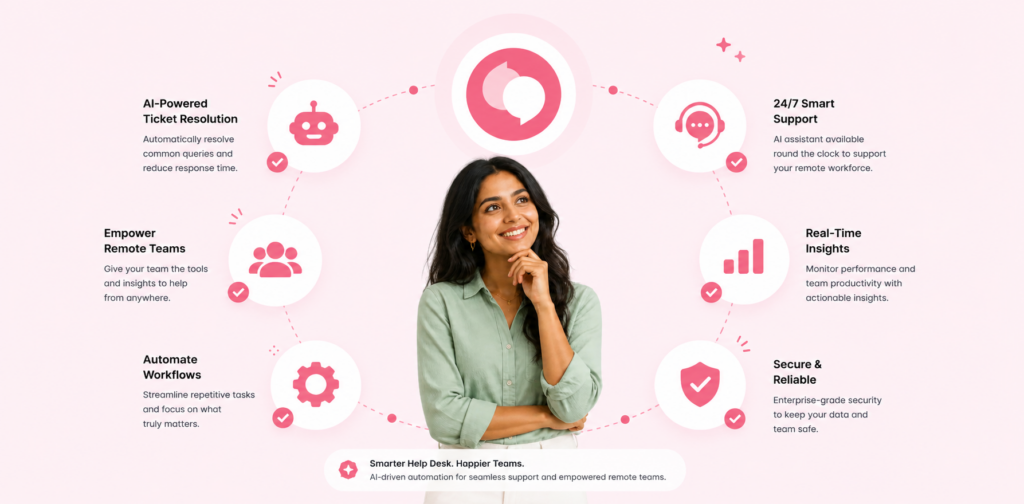
Remote support teams face unique challenges. Distributed across time zones, lacking in-person collaboration, and often managing higher ticket volumes with smaller teams, remote support professionals experience some of the highest burnout rates in customer service. Yet they're expected to deliver exceptional customer experiences across multiple channels with fewer resources.
AI help desk automation for remote teams transforms this equation. By automating routine ticket resolution, intelligently routing complex issues, and providing real-time support to agents, AI helps remote teams handle more tickets with fewer people while actually improving employee satisfaction and reducing burnout.
The Remote Support Team Challenge
Scale Without Hiring
Remote support teams typically handle 3-5x more tickets per agent than on-site teams. Without local collaboration, context-sharing becomes difficult. Knowledge bases get outdated. New team members struggle with onboarding. Adding headcount becomes prohibitively expensive, especially in distributed models.
Burnout and Retention
Support agent burnout is rampant. The combination of high volume, time zone challenges, and lack of team connection drives turnover rates of 30-50% annually. Replacing each agent costs $5,000-15,000. Losing institutional knowledge disrupts team performance.
Quality Consistency
Without centralized oversight, quality varies between team members. One agent achieves 90% satisfaction; another scores 65%. Messages lack consistency. Escalations happen at different thresholds. Some customers get premium service; others don't.
Knowledge Management
Distributed teams struggle with knowledge sharing. Critical information lives in individuals' heads or scattered emails. New policies take weeks to propagate. Agents duplicate work solving the same problems repeatedly.
How AI Helps Remote Teams
AI help desk automation addresses each challenge directly:
Handles routine tickets automatically (40-60% of volume), freeing agents for complex issues where human judgment matters.
Provides real-time guidance to agents facing unfamiliar issues, improving consistency and first-contact resolution.
Learns from team experience, codifying best practices and distributing knowledge across the team automatically.
Reduces administrative overhead, eliminating repetitive work and freeing time for actual customer interaction.
Works across time zones seamlessly, ensuring consistent response and escalation regardless of when tickets arrive.
Improves work-life balance, helping agents avoid the "always on" mentality that drives remote burnout.
The Business Impact
Cost Reduction
Consider a remote support team with 15 agents handling 6,000 tickets monthly. Current metrics:
- Average cost per ticket: $5
- Monthly support cost: $30,000
- Salary burden: $150,000/month
With AI handling 50% of routine tickets automatically:
- Processed by AI: 3,000 tickets at $0.10 each = $300
- Processed by humans: 3,000 tickets at $5 each = $15,000
- New total: $15,300/month (-$14,700 = -49%)
Productivity Increase
Each agent now handles 400 tickets/month instead of 400, but spends half their time on AI-assisted cases and half on complex issues. Net productivity improvement: agents feel less burned out, accuracy improves, satisfaction increases.
Retention Improvement
With burnout reduced, annual turnover drops from 40% to 15%. Hiring cost per agent: $10,000. Annual savings: 15 agents × 25% improvement × $10,000 = $37,500 just in hiring costs.
Implementation Strategy
Week 1: Assessment
Audit top 100 tickets across all categories. Identify which can be automated (FAQ, status updates, password resets, basic billing). Identify which need human touch. Get team input on biggest pain points. Set baseline metrics.
Week 2: Setup
Choose AI platform. Integrate with ticketing system. Upload knowledge base. Train on historical tickets. Configure escalation rules. Test integration thoroughly.
Week 3: Training
Train team on new workflows. Explain what AI handles. Show how to use AI suggestions. Practice with test tickets. Build confidence and buy-in.
Week 4: Soft Launch
Launch with 25% of incoming tickets routed to AI. Monitor accuracy daily. Gather team feedback. Make quick adjustments. Fix mis-categorizations. Improve responses based on team suggestions.
Week 5+: Optimization
Full rollout to all tickets. Continuous improvement cycle. Weekly team feedback sessions. Monthly accuracy reviews. Plan advanced features (predictive response suggestions, proactive outreach).
Real-World Results: Remote Support Teams
Case Study 1: Global SaaS Support (Remote across 6 time zones)
Pre-AI: 12 agents, 4,500 tickets/month, average response time 6 hours, 35% first-contact resolution, 35% agent turnover annually.
AI Implementation: Automated FAQ, account status, basic billing questions. Added smart ticket routing and agent suggestions.
Post-AI Results (90 days):
- Tickets automated: 55% (2,475/month)
- Response time: 6 hours → 15 minutes average
- First-contact resolution: 35% → 62%
- Agent headcount: 12 → 8 (with same ticket volume)
- Agent satisfaction: improved significantly
- Turnover rate: 35% → 12%
- Support cost: $22,500 → $10,800/month
Case Study 2: E-Commerce Support (Distributed USA)
Pre-AI: 20 agents, 8,000 tickets/month, wide quality variance (60%-90% satisfaction), training new agents took 4-6 weeks.
AI Implementation: Multi-language support, complex product question automation, routing optimization, agent performance coaching.
Post-AI Results (120 days):
- Consistent satisfaction: 60-90% improved to 82-86%
- New agent ramp time: 6 weeks → 2 weeks
- Tickets handled: increased 25% per agent
- Burnout-related absences: -40%
- Support cost per ticket: $3.50 → $1.80
Case Study 3: Technical Support (Global, multiple languages)
Pre-AI: 8 agents, complex technical issues, high escalation rate (45%), long resolution times (average 8 hours), low team morale.
AI Implementation: Technical knowledge base integration, diagnostic assistance for agents, smart escalation to experts, documentation automation.
Post-AI Results (90 days):
- Escalation rate: 45% → 18%
- Average resolution time: 8 hours → 2.5 hours
- Agent productivity: +35%
- Team morale survey: significantly improved
- Retention: 100% (vs. 75% annual)
Best Practices for Remote Teams
1. Build Knowledge Base Collaboratively
Don't let management build the knowledge base alone. Let team members contribute. Agents know what customers ask and what answers work. Their input creates a knowledge base that reflects real customer language and common variations.
2. Use AI for Agent Support, Not Replacement
Reframe AI not as "takes my job" but as "helps me do my job better." Show agents how AI handles the tedious stuff (resetting passwords, checking balances) and frees them for satisfying, complex problem-solving.
3. Transparent Escalation
When AI isn't confident, it escalates to humans with context. Agents see AI's reasoning. This builds trust and helps them learn how AI thinks, making them better at their jobs.
4. Continuous Feedback Loop
Weekly team meetings to review AI performance. What did it get wrong? What needs improvement? Quick implementation of feedback shows AI is a tool for the team, not management imposing something on them.
5. Performance Coaching
Use AI insights for positive coaching. Not "you're slower than AI" but "here's what the AI suggests for similar issues—try this approach." Use aggregate data to identify training opportunities.
Comparison: AI Help Desk vs. Hiring More Agents
| Factor | AI Solution | Hiring More |
|---|---|---|
| Setup cost | $2,000-5,000 | $10,000/person |
| Monthly cost | $500-2,000 | $8,000-12,000/person |
| Scalability | Infinite | Linear |
| Time to deploy | 2-3 weeks | 4-8 weeks (recruiting + training) |
| Consistency | Improves | Varies by person |
| Team morale | Improves (less burnout) | May worsen (new dynamics) |
| Time zones | Same everywhere | Need coverage |
| ROI timeline | 30 days | 90+ days |
Getting Started: 30-Day Action Plan
Week 1: Foundation
- Audit 100+ support tickets
- Identify repetitive issues (target: 40-60%)
- Map current team pain points
- Survey team on burnout factors
- Baseline metrics
Week 2-3: Implementation
- Choose AI platform
- Extract and organize knowledge base
- Train on historical tickets
- Set up integrations
- Internal testing
Week 4: Deployment
- Soft launch to 25% of tickets
- Daily accuracy monitoring
- Team feedback collection
- Adjustments and improvements
- Full rollout
Frequently Asked Questions
Q: Will AI make my job redundant? A: No. It handles routine work, freeing you for complex problem-solving where human judgment matters most.
Q: How accurate is the AI? A: Initial accuracy 70-75%; after 2-4 weeks with your data, typically 85%+.
Q: Can it understand technical issues? A: Yes, especially with good knowledge base. Technical support teams see excellent results with AI assistance.
Q: What about agent adoption? A: When framed as "tool to help you" rather than "replacement," adoption is typically 85%+ within 2 weeks.
Q: How long until we see ROI? A: Most teams see positive ROI within 30 days. Significant impact by 60-90 days.
Conclusion
AI help desk automation for remote teams solves the core tension: deliver more support with fewer resources without burning out your team. By automating routine work, supporting agents with smart suggestions, and enabling consistency across distributed teams, AI becomes the remote support team's best teammate.
The result: teams that handle more tickets, achieve higher satisfaction, experience less burnout, and stay together longer. That's a win for the team, the company, and the customers.
Next Steps
- Audit your top 50 support tickets - identify what could be automated
- Calculate current cost per ticket - establish your baseline
- Survey your team - understand their biggest pain points
- Request platform demos - see how AI works for your type of support
- Plan 4-week pilot - start small, measure impact, scale
Ready to transform your remote support team? Start with a 14-day trial and see the difference AI can make in your team's workload and morale.


2 Responses on this post
Comments are closed.