


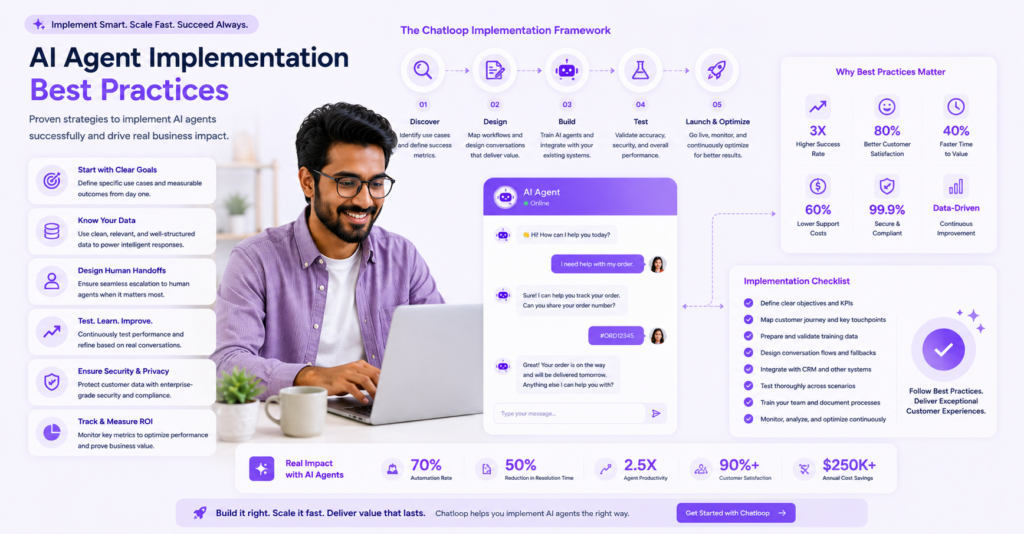
Implementing an AI agent can transform your customer support operations, but success requires careful planning and execution. This guide covers the 10 most important best practices that separate successful implementations from failed ones.
What You'll Learn
- Core implementation principles
- Step-by-step setup guide
- Real-world use cases and success stories
- Best practices and optimization strategies
- ROI calculation and business impact
- FAQ and troubleshooting
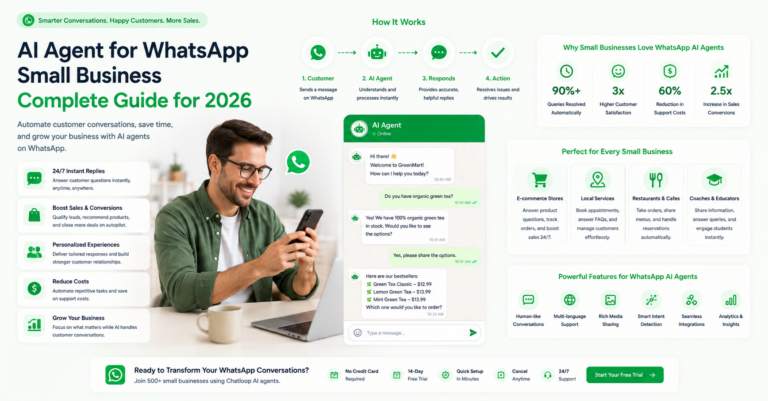
Featured Image

Visual checklist showing 10 key best practices for implementing AI agents successfully
Best Practice #1: Start with Clear Objectives
Before implementing, define what success looks like for your business.
Why it matters: Vague objectives lead to wasted resources and poor outcomes. Clear metrics enable measurement and optimization.
How to implement:
- Define specific, measurable goals (e.g., reduce response time by 50%)
- Identify key performance indicators (KPIs)
- Set realistic timelines
- Get stakeholder buy-in
Best Practice #2: Prepare a Comprehensive Knowledge Base
Your AI agent is only as good as the data it learns from.
Why it matters: Poor training data results in inaccurate responses and customer frustration.
Data to include:
- FAQ documents
- Product documentation
- Troubleshooting guides
- Common customer inquiries
- Policy documents
- Step-by-step guides
Best Practice #3: Map Your Customer Journey
Understand where agent automation can have the biggest impact.
Why it matters: Not all touchpoints benefit equally from automation. Strategic placement maximizes ROI.
Customer journey touchpoints:
- Initial inquiry/pre-sales
- Onboarding questions
- Billing inquiries
- Technical support
- Returns and refunds
- Feedback and surveys
Best Practice #4: Test Extensively Before Launch
Never deploy a agent without thorough testing.
Testing phases:
-
Internal Testing (Week 1-2)
- Test with team members
- Verify accuracy
- Check response quality
-
Beta Testing (Week 3-4)
- Limited user group
- Gather feedback
- Monitor performance
-
Load Testing (Week 4-5)
- Test concurrent conversations
- Verify system stability
- Check response times
Best Practice #5: Implement Clear Escalation Paths
Not every conversation can or should be handled by AI.
Escalation triggers:
- Customer frustration detected
- Multiple failed attempts
- Complex issues
- Customer explicitly requests human
- Sensitive matters (billing, account security)
Best Practice #6: Monitor and Analyze Conversations
Data-driven optimization is essential for long-term success.
Metrics to track:
- Resolution rate (target: >70%)
- First-contact resolution (target: >60%)
- Customer satisfaction (target: >4/5)
- Average conversation duration
- Human escalation rate (target: <30%)
- Cost per interaction (track for ROI)
Best Practice #7: Continuously Update Your Knowledge Base
Static knowledge bases lead to outdated responses.
Update frequency:
- Monthly: Review common unanswered questions
- Quarterly: Update policies and procedures
- As-needed: Address customer feedback
Best Practice #8: Train Your Support Team
Your human agents will handle escalations—they need proper training.
Training topics:
- How the AI agents works
- System capabilities and limitations
- Viewing agent conversations
- Handling escalated issues
- Providing feedback to improve AI
Best Practice #9: Set Up Performance Monitoring
Monitor the agent's health continuously.
Dashboard elements:
- Availability/uptime
- Response accuracy
- Customer satisfaction trends
- Peak usage times
- System errors or failures
Best Practice #10: Plan for Continuous Improvement
Implementation is not a one-time event—it's ongoing optimization.
Optimization cycle:
- Collect data (weekly)
- Analyze performance (weekly)
- Identify issues (weekly)
- Test improvements (bi-weekly)
- Deploy updates (monthly)
- Review results (monthly)
Common Mistakes to Avoid
| Mistake | Impact | Solution |
|---|---|---|
| Poor knowledge base | Low accuracy | Invest time in data preparation |
| No escalation path | Customer frustration | Implement clear handoff to human agents |
| Ignoring feedback | Static performance | Establish feedback loop and update schedule |
| Over-automation | Customer annoyance | Balance automation with human touch |
| Inadequate monitoring | Silent failures | Set up real-time dashboards |
Real-World Implementation Timeline
Week 1: Planning
- Define objectives and KPIs
- Prepare knowledge base
- Plan agent flow
Week 2: Setup
- Configure agent platform
- Input training data
- Build conversation flows
Week 3-4: Testing
- Internal testing
- Refinements based on feedback
- Beta testing with limited users
Week 5: Launch
- Full deployment
- Team training
- Monitor closely
Week 6+: Optimization
- Analyze data
- Make improvements
- Scale operations
ROI Case Study: E-commerce Implementation
Company: Mid-size e-commerce store Monthly tickets: 500 Average resolution time: 2 hours (manual) Cost per ticket: $5
After AI agent implementation:
- 70% fully automated (350 tickets/month)
- 30% escalated to humans (150 tickets/month)
- Response time: <2 minutes (automated)
- Cost per ticket: $1.50
Monthly savings: $1,750 Annual savings: $21,000 Implementation cost: $2,000 (first month) ROI: 1000% in first year
For a deeper look at how online stores apply this, see our guide on conversational AI for e-commerce customer success.
Key Metrics Dashboard
| Metric | Before AI | After AI | Improvement |
|---|---|---|---|
| Avg response time | 2 hours | 30 seconds | 240x faster |
| First contact resolution | 40% | 75% | +35% |
| Customer satisfaction | 3.5/5 | 4.2/5 | +20% |
| Cost per ticket | $5.00 | $1.50 | -70% |
| Team productivity | 100% | 150% | +50% |
FAQ & Troubleshooting
Q: What if the agent keeps giving wrong answers?
A: This usually indicates poor training data. Review your knowledge base, add missing information, and test new scenarios before deploying.
Q: How long before we see ROI?
A: Most companies see positive ROI within 3-6 months, with full payback in 6-12 months depending on ticket volume.
Q: Can we run the agent and human agents in parallel?
A: Yes, this is recommended. Start with specific chat topics and gradually expand as confidence grows.
Q: How to handle customer frustration with agents?
A: Ensure clear escalation to humans, provide a satisfying user experience, and quickly resolve issues the agent can't handle.
Q: What's the typical accuracy rate?
A: Well-implemented agents achieve 85-95% accuracy for common questions. Accuracy improves over time with continuous optimization.
Implementation Checklist
- Define clear business objectives and KPIs
- Prepare and organize knowledge base
- Map customer journey touchpoints
- Create conversation flows and scripts
- Set up escalation routing to humans
- Configure platform integrations
- Conduct internal testing
- Gather team feedback
- Set up monitoring and analytics
- Train support team on new system
- Plan beta testing
- Deploy to production
- Monitor first week closely
- Collect customer feedback
- Establish optimization schedule
Advanced Topics
Sentiment Analysis
Implement sentiment detection to:
- Identify frustrated customers
- Trigger immediate escalation
- Monitor conversation tone
- Improve response quality
Multi-Language Support
If serving global customers:
- Enable language detection
- Maintain separate knowledge bases
- Test translation accuracy
- Cultural sensitivity check
Integration Ecosystem
Connect your agent with:
- CRM systems
- Ticketing platforms
- Payment processors
- Analytics tools
- Communication channels
Conclusion
Successful AI agent implementation requires careful planning, thorough testing, and continuous optimization. By following these 10 best practices, you can avoid common pitfalls and achieve significant ROI within the first year.
Author Bio
Chatloop Editorial Team
Chatloop Editorial Team provides expert guidance on implementing and optimizing AI agents for business transformation.


Comments are closed.