


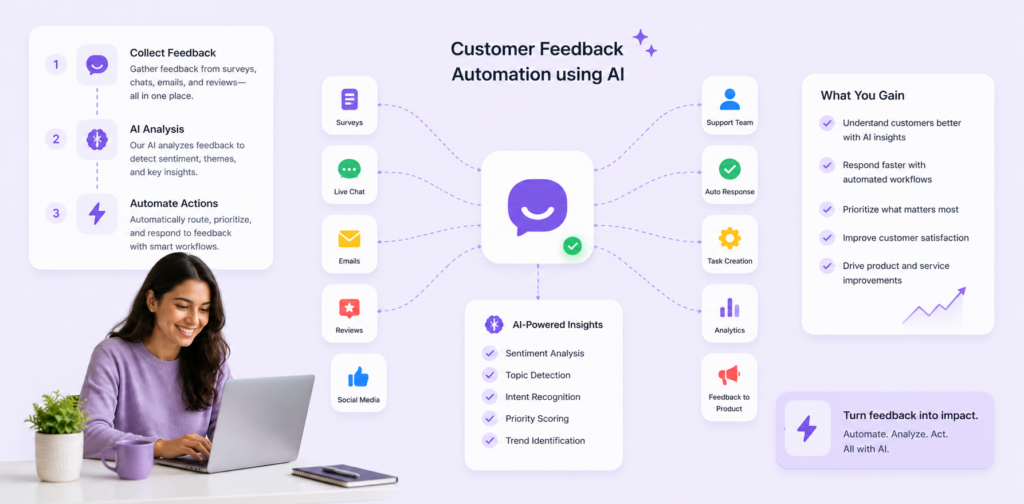
Every support ticket is a customer expectation waiting to be met. When a ticket lands with the wrong agent — someone too junior for the problem, already overloaded, or specialised in a completely different area — that expectation gets broken before anyone has even typed a response.
Ticket routing is one of the most overlooked levers in support operations. Most teams optimise for response scripts, knowledge bases, and agent training. Far fewer have systematically addressed how tickets get to agents in the first place. The routing decision — which takes seconds in an automated system — can add hours of delay and meaningfully degrade resolution quality when done manually.
This guide covers everything: what intelligent ticket routing actually is, how to build the logic behind it, a four-phase implementation roadmap, and a real-world case study that shows what's achievable within 30 days.
Table of Contents
- What is support ticket routing?
- The real cost of manual routing
- How intelligent routing works
- Types of routing rules
- 4-phase implementation roadmap
- Real-world results: B2B SaaS case study
- Best practices and common pitfalls
- Manual vs. automated: full comparison
- Frequently asked questions
What is support ticket routing?
Support ticket routing is the process of automatically directing an incoming customer request to the most suitable agent, team, or automated handler based on a set of predefined criteria. Instead of a manager manually reading each ticket and deciding where it should go — or worse, an unattended queue where agents grab whatever's next — routing logic makes that decision instantly and at scale.
At its simplest, routing might be a single rule: all billing questions go to the billing team. At its most sophisticated, it becomes a multi-variable system that considers issue type, ticket priority, customer tier, agent expertise, current workload, historical resolution rates, and even time of day — all at once, in milliseconds.
Modern routing systems sit at the intersection of workflow automation and machine learning. They don't just follow static rules; they learn from outcomes, adjusting future assignments based on which pairings historically produced faster, higher-quality resolutions.
Key definition: Intelligent ticket routing = the right ticket + the right agent + the right time, determined automatically without manager intervention.
The real cost of manual routing
Before quantifying the opportunity, it's worth being precise about what manual routing actually costs — because teams often underestimate how much friction this single process introduces.
The hidden time tax on managers
In teams that rely on manual routing, a manager or team lead typically reviews the incoming queue at intervals — sometimes every 15 minutes, sometimes hourly. Each review involves reading ticket context, checking agent availability, making a judgement call, and either manually reassigning or flagging for attention. At 100+ tickets per day, this can consume 1–2 hours of management time that should be spent coaching, escalation handling, or strategic work.
The expertise mismatch problem
When tickets are grabbed from a shared queue on a first-come, first-served basis, complex technical issues regularly land with junior agents who lack the context to resolve them. The result is a chain of inefficiency: the agent spends time attempting a resolution they can't complete, eventually escalates, and the customer has now been waiting twice as long as necessary.
First-contact resolution rate — arguably the most important support metric — drops significantly when tickets are mismatched to agent capability. Every unnecessary escalation is a failure point.
The workload imbalance effect
Without intelligent distribution, knowledge specialists become bottlenecks. Senior engineers queue up with ten complex tickets while junior agents sit with two simple ones. This imbalance burns out your best people, under-utilises your less experienced team, and creates systemic resolution delays that compound across the day.
Opportunity: With 100+ daily tickets, optimising even 10–15% of assignments saves hundreds of agent-hours each month while materially improving first-contact resolution rates and customer satisfaction scores.
How intelligent routing works
Intelligent ticket routing is a four-stage pipeline: analyse the incoming ticket, evaluate available agents, optimise the match, and learn from the outcome.
Stage 1: Ticket analysis
When a ticket enters the system, the routing engine analyses its attributes before assignment:
- Issue classification — is this a billing query, a technical bug, a feature request, or an account question? NLP models can classify this from the ticket text itself.
- Urgency signals — keywords like "urgent", "outage", "cannot access", or SLA tier flags that indicate high priority.
- Complexity scoring — a simple password reset is not the same complexity as a broken API integration. Routing systems can be trained to score this.
- Customer history — has this customer raised a ticket before? Do they have a preferred agent? Are they on an enterprise plan that warrants priority handling?
Stage 2: Agent matching
Simultaneously, the system evaluates the available pool of agents:
- Expertise profile — each agent has tagged skills and product areas they're certified or experienced in.
- Current workload — how many open tickets does this agent currently hold? What is their average handling time?
- Availability — is the agent online? Are they in a scheduled callback or escalation call?
- Historical performance — what's this agent's resolution rate and CSAT score for tickets of this type?
Stage 3: Match optimisation
The routing engine combines ticket analysis and agent evaluation to generate an optimal assignment. In rule-based systems, this means finding the first agent who meets all the routing criteria. In ML-enhanced systems, it means scoring all valid candidates and selecting the one most likely to produce a fast, high-quality resolution — weighted by expertise match, availability, workload capacity, and relationship factors.
Stage 4: Continuous learning
After resolution, the system closes the loop. It records how long the assigned agent took to respond and resolve, whether the ticket was escalated, and what CSAT score was given. These outcomes feed back into the routing model, nudging future assignments toward pairings that historically perform well and away from those that don't. Over time, the system gets measurably smarter.
Types of routing rules
Not every routing system needs the same logic. The right rule set depends on your team structure, ticket volume, and product complexity. Here are the six main routing approaches and when to use each.
Skill-based routing
Matches ticket type to agent expertise. Best for teams with clear specialisations — e.g. technical vs. billing vs. onboarding. Always the recommended starting point.
Load-based routing
Distributes tickets to agents with the lowest current workload. Prevents bottlenecks and protects specialists from overload. Should be layered on top of skill-based routing, not used as a replacement.
Time-based routing
Routes by agent availability and time zones. Essential for global teams covering multiple time windows. Ensures tickets don't sit unassigned when specialists in one region are offline.
Priority-based routing
Fast-tracks tickets from enterprise customers or high-urgency issues to senior or dedicated agents. Protects high-value relationships and ensures SLA compliance for top-tier accounts.
Round-robin routing
Cycles through available agents evenly. Simple and fair — ideal as a fallback when no other criteria differentiate candidates, or for teams with uniform skill levels.
Relationship routing
Assigns returning customers to the agent who previously handled their account. Reduces re-explanation friction and improves CSAT by maintaining continuity in the support relationship.
In practice, well-designed routing systems combine multiple rule types in a priority hierarchy. A typical setup applies skill-based filtering first, then load-balances within the qualified pool, then falls back to round-robin if no specialist is available.
4-phase implementation roadmap
Moving from manual to automated routing doesn't require a six-month project. A focused four-week implementation can get you from zero to a functional, improving system.
Phase 1: Data collection and audit (Weeks 1–2)
Before defining routing rules, you need to understand your current state. Pull the last 90 days of ticket data and analyse: what are the most common issue types, how are tickets currently being assigned, what's the average resolution time by ticket type and agent, and where are the escalation hotspots?
This audit becomes the evidence base for your routing logic. Don't skip it — teams that skip straight to rule configuration typically build rules based on assumptions rather than data, and then wonder why results are underwhelming.
Phase 2: Routing rules definition (Weeks 2–3)
Map issue types to the agents best equipped to handle them. Build an expertise matrix for each team member — what can they handle confidently, what requires escalation, what are they developing in? Define your priority tiers: which customers or issue types warrant immediate senior attention?
Document every rule in plain language before you touch a single configuration screen. Rules that are clear on paper are far easier to configure correctly and to debug when something goes wrong.
Phase 3: Automation setup and testing (Weeks 3–4)
Connect your routing engine to your ticketing platform and configure the rules you defined. Test with a sample set of historical tickets — does the system assign them the way your best human router would have? Identify edge cases and refine rules before going live. Keep a human override channel open for the first two weeks of production use.
Phase 4: Launch, monitor and optimise (Week 4 onwards)
Go live with automated routing. Track your key metrics daily for the first two weeks: first response time, resolution time, escalation rate, agent utilisation balance, and CSAT. Set up a fortnightly routing review — look at which rules are triggering most often, which assignments are being manually overridden, and what the outcome data suggests about rule refinements.
Treat routing as a living system, not a set-and-forget configuration.
Real-world results: B2B SaaS case study
Here's a documented example from a B2B SaaS company that implemented intelligent routing across their 12-person support team handling 150+ tickets per day.
Before: the manual routing baseline
The team operated with a shared inbox where agents grabbed the next available ticket. A senior manager spent roughly 90 minutes per day reviewing the queue and manually escalating complex issues. Despite good individual agent performance, the routing process was introducing systemic delays:
| Metric | Before |
|---|---|
| Average first response time | 4 hours |
| Average resolution time | 2+ days |
| Escalation rate | 35% |
| CSAT score | 71/100 |
| Agent utilisation | High variance — senior engineers consistently overloaded |
The routing changes made
The team implemented skill-based routing as the primary logic, with load-balancing as the secondary filter:
- Complex technical issues (API, integrations, data export bugs) → senior engineers only
- Billing, invoicing, and plan changes → billing specialist team
- Common onboarding and "how do I" queries → junior agents and self-service deflection first
- Enterprise tier customers → dedicated account-linked agents
- Load-balancing applied within each skill tier to prevent bottlenecks
Results after 30 days
| Metric | Before | After | Change |
|---|---|---|---|
| First response time | 4 hours | 15 minutes | ↓ 94% |
| Average resolution time | 2+ days | 4 hours | ↓ ~80% |
| First-contact resolution rate | Baseline | +25% | Improved |
| CSAT score | 71/100 | 91/100 | +20 points |
| Agent utilisation variance | High | Balanced | Normalised |
The 90 minutes per day the manager had been spending on manual routing was fully reclaimed — reinvested into agent coaching and proactive customer outreach that had been consistently deprioritised under the previous system.
Best practices and common pitfalls
Start with the simplest rules that will make the biggest difference
The temptation when implementing routing is to build the most comprehensive logic possible from day one. Resist this. Start with two or three high-impact rules — most likely skill-based routing for your most complex ticket category — and measure the effect before layering on additional logic.
Always maintain a manager override
Automated routing should accelerate human judgement, not replace it entirely. Build in a simple override mechanism that lets managers reassign tickets when context the system can't see makes a different assignment appropriate. Every override should be logged — these are your richest signal for improving routing rules.
Monitor quality alongside efficiency
A routing system that dramatically improves first response time but routes complex tickets to agents who struggle with them is creating a different problem. Track resolution quality — first-contact resolution rate, re-open rate, CSAT by agent and ticket type — alongside efficiency metrics.
Balance workload deliberately
Skill-based routing without a load-balancing layer will recreate the bottleneck problem in a different form. Combine expertise matching with workload caps: no agent should receive new tickets once their active queue exceeds a defined threshold.
Gather agent feedback systematically
Your agents can see something the routing data often can't: whether the tickets reaching them are genuinely the right fit. Set up a short monthly survey asking agents whether the routing system is making their work easier, which assignment types feel like mismatches, and what changes they'd suggest.
Common pitfall: routing to availability instead of expertise
The most frequent mistake in early-stage implementations is defaulting to availability as the primary signal. Availability should be a filter, not a selector. Always lead with expertise match; then apply availability and workload as secondary constraints.
Common pitfall: treating routing as a one-time project
Your team changes. New agents join. Product areas grow in complexity. A routing configuration that's optimal today will drift out of alignment over 6–12 months without regular review. Schedule a quarterly routing audit as a standing calendar event.
Manual vs. automated: full comparison
| Factor | Manual | Automated |
|---|---|---|
| Time to assign | 5–15 minutes per ticket | Instant (sub-second) |
| Match quality | Inconsistent — depends on manager availability | Consistently optimised |
| Workload balance | Tends to be uneven | Active load-balancing built in |
| After-hours coverage | Queue accumulates | Routes automatically 24/7 |
| Scalability | Breaks down at volume | Handles 10x volume with no overhead |
| Learning over time | Slow and informal | Continuous — improves from every ticket |
| Reporting visibility | Low — rarely logged systematically | Full audit trail of every assignment |
| Cost | High — manager time is expensive | Low marginal cost once implemented |
Getting started: your routing readiness checklist
Before configuring a single routing rule, work through these five questions:
- How are tickets currently assigned? Document your current process, including all informal workarounds and manager interventions.
- What are your top five ticket types by volume? These are your routing priorities — start here before handling edge cases.
- What can each agent handle confidently? Build an explicit expertise matrix covering both subject areas and complexity tiers.
- What does a bad assignment look like? Identify the mismatches that cause the most damage to resolution time or CSAT. These define your highest-priority routing rules.
- How will you measure improvement? Define your baseline metrics before go-live — first response time, resolution time, escalation rate, CSAT, and agent utilisation variance.
Frequently asked questions
What is support ticket routing? Support ticket routing is the process of automatically directing incoming customer support requests to the most appropriate agent, team, or automated workflow. Rather than relying on manual queue management or first-come-first-served assignment, routing logic matches each ticket to the right handler based on issue type, agent expertise, workload, priority, and other configurable criteria.
How much does automated routing improve response time? Companies implementing intelligent routing typically see first response times fall from 3–4 hours to under 15 minutes, and overall resolution times drop from 2+ days to an average of 4 hours — a 60–80% reduction in key support metrics. Results vary based on team size, ticket complexity, and how well routing rules are configured.
What's the difference between skill-based and load-based routing? Skill-based routing matches a ticket to agents with the relevant expertise. Load-based routing distributes tickets to balance workload across available agents. Best-practice systems use both: skill-based matching narrows the candidate pool, then load-balancing selects the optimal agent within that pool.
How long does it take to implement automated ticket routing? A functional automated routing system can be implemented in 3–4 weeks across four phases: data collection and audit (1–2 weeks), routing rules definition (1 week), system configuration and testing (1 week), then live launch and ongoing optimisation. Most teams see measurable improvement in first response time within the first week of go-live.
Should managers still be able to override automated routing? Yes — always. Override functionality lets team leads handle edge cases the system can't anticipate, and logged overrides provide valuable data for improving routing rules over time.
What metrics should I track after implementing ticket routing? The five most important metrics to baseline before implementation and track weekly are: first response time, average resolution time, escalation rate, first-contact resolution rate, and agent utilisation variance.
Ready to eliminate routing delays? See how Chatloop handles intelligent ticket routing — and get your first workflow running today.




3 Responses on this post
Comments are closed.