


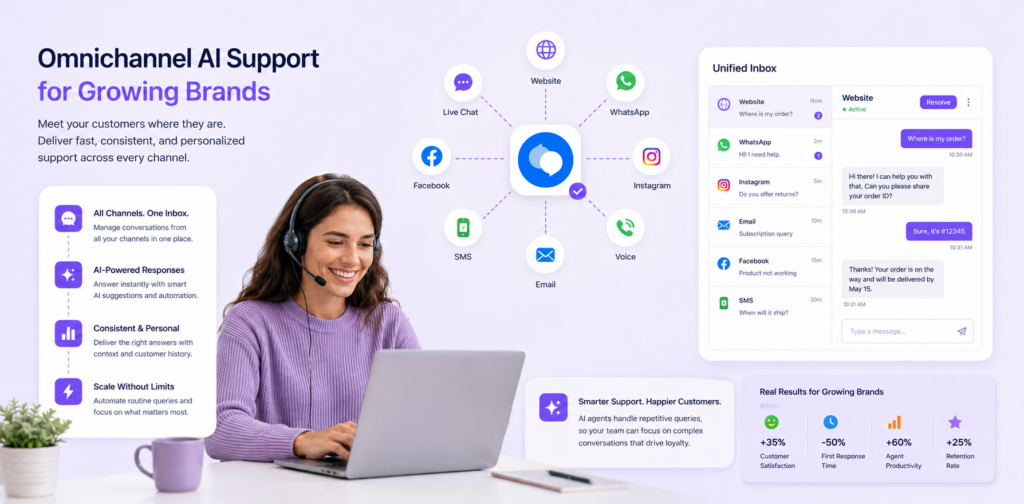
WhatsApp has transformed how small businesses communicate with customers. With over 2 billion active users worldwide and more than 100 million daily messages exchanged between businesses and their customers, it has become the default channel for fast, personal support. But responding to every message manually is no longer sustainable — and that is exactly where an AI agent for WhatsApp small business changes everything.
In this guide, you will learn how AI agents work on WhatsApp, why they matter for small business growth, and how to implement one that handles real customer conversations — without writing a single line of code.
What Is an AI Agent for WhatsApp Small Business?
An AI agent for WhatsApp is an intelligent, automated system that manages customer conversations on the WhatsApp Business platform. Unlike basic rule-based chatbots that follow a fixed script, AI agents use natural language processing (NLP) and machine learning to understand what customers are asking — and respond with accurate, contextual answers.
For small business owners, this means your WhatsApp inbox can respond 24/7, handle dozens of conversations simultaneously, and still sound like it comes from someone who knows your business inside out.
Core Capabilities of a WhatsApp AI Agent
- 24/7 availability: Responds to customer messages instantly, even outside business hours
- Multi-language support: Communicates with customers in their preferred language automatically
- Smart escalation: Detects when a question needs a human and routes it to the right team member
- Conversation context: Maintains history across a conversation for personalised, coherent responses
- System integrations: Connects to your CRM, inventory, calendar, and payment tools
Why Small Businesses Need WhatsApp Business Automation in 2025
The Support Gap Is Growing
Customer expectations have shifted permanently. The average response time customers now expect on WhatsApp is under five minutes. For a small business owner juggling operations, sales, and support with a lean team, that is an impossible standard to meet manually — at least not sustainably.
AI support for small business through WhatsApp directly addresses this gap. It closes the window between a customer asking a question and getting an answer, which directly influences purchase decisions and repeat business.
The Numbers That Make the Case
- 80% of customers prefer messaging over calling
- Small businesses typically handle between 5 and 50 support requests per day
- Manual responses cost an estimated £0.40–£1.60 per ticket when you factor in staff time
- Businesses using conversational AI for small business report 60–70% faster response times
- Customer satisfaction scores improve by 35–45% on average after AI agent deployment
How WhatsApp AI Agents Work: The Technology Behind It
Modern AI agents used for WhatsApp business automation are built on several interconnected technologies:
- Natural Language Processing (NLP) — understands what the customer is saying, including informal language, abbreviations, and misspellings
- Intent recognition — categorises the request (refund, booking, product query, complaint) so the right response is triggered
- Knowledge base retrieval — pulls from your business information to generate accurate, brand-specific answers
- API integrations — connects to your systems to check live data such as order status, availability, or account details
- Escalation logic — identifies when a conversation has moved beyond automated handling and hands it to a human agent
A Real Conversation Flow
Here is an example of how an AI agent handles a customer query end to end:
Customer: "Can I get a refund on order #12345?"
AI Agent: "Happy to help. I can see your order was placed on 14 May and qualifies for our 30-day return policy. Would you like me to initiate the refund process, or do you have questions about the timeline?"
The agent has checked the order, confirmed eligibility, and moved the conversation forward — all without a human touching it.
Setting Up an AI Agent for WhatsApp: Step-by-Step
Step 1 — Planning Your Automation Strategy (Days 1–3)
Before choosing a platform, define what success looks like for your business:
- What percentage of enquiries should the AI handle? Target 40–60% to start
- Which conversation types are best automated? FAQs, order tracking, bookings, and pricing questions are ideal
- What is your budget? Most small business plans range from £80–£400/month
- What are your escalation rules? Define when the AI should hand off to a human
Step 2 — Building Your Knowledge Base (Days 4–10)
Your AI agent is only as good as the information you give it. Prepare the following before going live:
- FAQs: Your 30–50 most common customer questions with clear, accurate answers
- Product and service details: Descriptions, pricing, availability, and key differentiators
- Policies: Returns, refunds, shipping timelines, and warranty terms
- Escalation contacts: Who handles billing, complaints, or technical issues
- Business hours: When humans are available and how long responses take
Step 3 — Platform Selection and Configuration (Days 11–15)
When evaluating platforms for WhatsApp business automation, look for:
- No-code setup with a visual builder (no developer needed)
- Native WhatsApp Business API integration
- Knowledge base management with easy updates
- Built-in analytics and conversation reporting
- Human handoff capability with live agent inbox
- GDPR compliance and data encryption
chatloop.io covers all of these requirements out of the box, making it one of the most practical options for small business owners who want results without technical overhead.
Step 4 — Testing Before You Go Live (Days 16–18)
Never skip testing. Run these checks before opening your AI agent to customers:
- Send your top 20 common questions and review every response
- Test edge cases — unusual questions, multi-part queries, angry or emotional messages
- Verify that escalation works correctly and routes to the right person
- Check the agent handles out-of-scope questions gracefully without making things up
- Test on both iOS and Android WhatsApp to confirm formatting looks correct
Step 5 — Launch and Optimise (Days 19–30)
Start with a soft launch. Route 20–30% of conversations through the AI agent while monitoring quality closely. After 5–7 days with no major issues, expand to your full customer base. Review performance weekly for the first month.
Implementation Timeline at a Glance
| Phase | Duration | Key Tasks | Expected Output |
|---|---|---|---|
| Planning | 3 days | Goals, audit, success metrics | Clear objectives defined |
| Knowledge base | 7 days | FAQs, policies, product info | 40–50 Q&A pairs ready |
| Configuration | 5 days | Platform setup, integrations, testing | Live test environment |
| Launch | 5 days | Soft launch, monitoring | System stable at 20% traffic |
| Optimisation | Ongoing | Weekly reviews, updates | 40–60% automation rate |
Best Practices for WhatsApp Business Automation
1. Start Narrow, Then Expand
Begin with FAQ automation only. Once your AI agent is handling basic queries reliably, layer in more complex workflows: order status lookups, appointment scheduling, product recommendation flows, and support ticket routing.
2. Keep the Human Option Visible
Always give customers a clear way to reach a person. The phrase "Type AGENT at any time to speak with our team" should appear early in every conversation. Customers who know they can escalate trust the automated experience more, not less.
3. Audit Conversations Weekly
Review the conversations your AI agent could not resolve. These failed conversations are your most valuable improvement data. Add new answers to the knowledge base, adjust intent thresholds, and refine escalation triggers based on what you find.
4. Disclose That Customers Are Talking to AI
This is both a best practice and increasingly a legal requirement in many markets. A simple opening line such as "Hi, I am chatloop.io's AI assistant. I can help with orders, bookings, and FAQs — or connect you with the team" sets honest expectations and reduces frustration.
5. Track the Metrics That Matter
- Automation rate — percentage of conversations fully resolved without human involvement
- Average first response time — should drop to under 10 seconds
- Escalation rate — should settle between 10–25% of total conversations
- Customer satisfaction score (CSAT) — survey after each resolved conversation
- Conversion rate from chat — for sales-focused use cases
ROI Calculator: What the Numbers Look Like for a Typical Small Business
A conservative model for a small business receiving 30 WhatsApp enquiries per day:
| Metric | Without AI Agent | With AI Agent |
|---|---|---|
| Daily enquiries | 30 | 30 |
| Automated (50%) | 0 | 15 resolved by AI |
| Time per manual reply | 5 minutes | 5 minutes |
| Daily staff time on WhatsApp | 150 minutes | 75 minutes |
| Monthly staff cost (at £15/hr) | ~£562 | ~£281 |
| Monthly platform cost | £0 | ~£159 |
| Net monthly saving | — | ~£122 |
| Annual saving | — | ~£1,464 |
That calculation does not include the revenue upside from faster response times, reduced lead drop-off, and out-of-hours conversions — which typically add another 15–25% to overall revenue from the same traffic.
Real-World Results: Small Business Case Studies
Case Study 1 — Online Retail Store
Business: 3-person e-commerce store selling homeware
Challenge: 35+ WhatsApp messages per day, average response time 4–6 hours
Solution: AI agent for order tracking, return requests, and shipping queries
After 3 months: 52% of enquiries handled automatically, response time dropped to under 30 seconds, customer satisfaction rose from 76% to 93%, and the team reclaimed 2 hours per day.
Case Study 2 — Local Service Business
Business: Plumbing and heating company, 4 staff
Challenge: After-hours booking requests were being missed entirely
Solution: AI agent for appointment booking, service area confirmation, and emergency callout triage
After 6 weeks: 100% of after-hours enquiries captured, booked appointments increased by 28%, and the owner stopped losing leads to competitors who responded faster.
AI Agent vs. Email vs. Traditional Chatbot
| Feature | AI Agent (WhatsApp) | Email Support | Traditional Chatbot |
|---|---|---|---|
| Response time | Seconds | Hours or days | Seconds |
| Customer preference | High (80%) | Low (15%) | Mixed |
| Automation potential | 40–60% | 10–20% | 20–40% |
| Conversation quality | Natural, contextual | Formal | Scripted, rigid |
| Learns over time | Yes | No | No |
| Typical monthly cost | £80–£300 | £400–£1,500 | £40–£120 |
Common Challenges and How to Solve Them
| Challenge | Cause | Solution |
|---|---|---|
| AI gives wrong answer | Knowledge base gap | Add the question and correct answer; review weekly |
| Responses feel robotic | Tone not configured | Customise the agent persona and add conversational phrasing |
| Customers keep asking for a human | Trust not established | Introduce the AI clearly and show its capabilities upfront |
| Integration not syncing | API configuration issue | Use a platform with pre-built connectors and support |
| Data privacy concerns | Unclear data handling | Choose a GDPR-compliant platform with encryption |
Frequently Asked Questions
How long does it take to set up a WhatsApp AI agent for a small business?
Most small businesses are live within 2–4 weeks using a no-code platform. The bulk of the time is spent preparing your knowledge base, not configuring the technology.
Do I need the WhatsApp Business API to use an AI agent?
Yes. AI agents that handle automated conversations at scale require the WhatsApp Business API rather than the standard WhatsApp Business app. Most platforms, including chatloop.io, manage this connection for you.
Can the AI handle multiple languages?
Yes. Most modern AI agent platforms support automatic language detection and can respond in the customer's language across 50+ languages without any manual configuration.
What happens when the AI cannot answer a question?
A well-configured AI agent will recognise when it is out of its depth and hand the conversation to a human agent with full conversation context transferred, so the customer does not have to repeat themselves.
Is customer data on WhatsApp secure?
WhatsApp uses end-to-end encryption for all messages. On the platform side, reputable AI agent providers offer enterprise-grade encryption, data residency controls, and full GDPR compliance.
What is the minimum enquiry volume where AI makes financial sense?
Businesses handling 10 or more customer enquiries per day typically see a clear return within the first 60 days. Below that threshold, a managed inbox with templated responses may be more practical.
Conclusion
An AI agent for WhatsApp small business is no longer reserved for large enterprises with dedicated development teams. No-code platforms have made it accessible to any business owner who wants to respond faster, handle more volume, and stop losing customers to slow reply times.
The key is to start focused — automate your most common 20 questions first, measure the results, and build from there. Most businesses that go through a structured 4-week implementation see automation rates of 40–60% within the first month, with measurable improvements in both customer satisfaction and staff capacity.


2 Responses on this post
Comments are closed.