


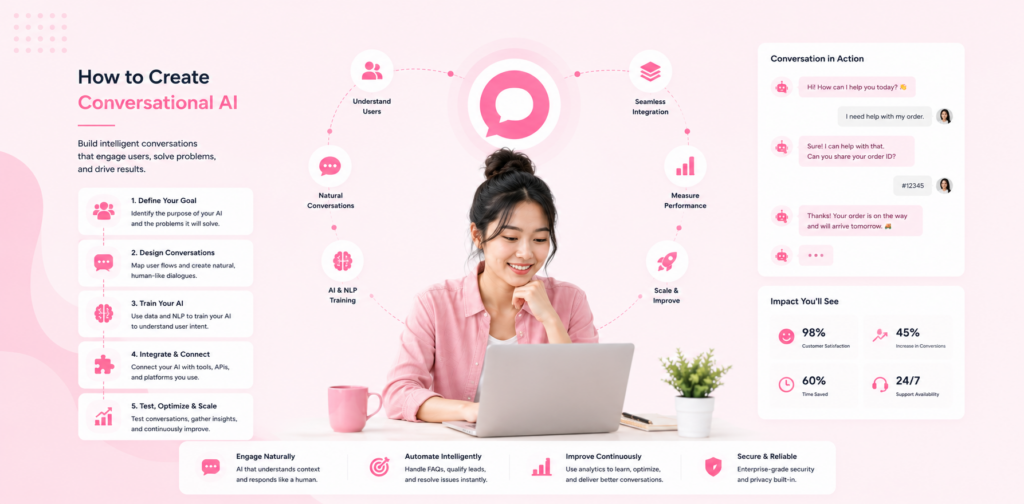
"Conversational AI" sounds like something reserved for companies with AI research teams and multi-million dollar budgets. In 2026, it's not. A two-person e-commerce store, a local solicitors practice, and a growing SaaS startup can all create and deploy conversational AI — and see measurable results within weeks.
This guide explains what conversational AI actually is (in plain language), how to design it for your business, and how to build and launch it without needing an engineering background.
What is Conversational AI? (Plain English)
Conversational AI is software that can hold natural language conversations with humans — understanding what they mean, not just what they literally typed.
Unlike old-school chatbots that followed scripted "if this → then that" decision trees, modern conversational AI uses large language models (LLMs) that understand context, intent, and nuance.
Example:
Old chatbot: Customer types "refund" → Bot shows refund policy article.
Conversational AI: Customer types "Hey, I bought this last Tuesday and it's not what I expected, can I send it back?" → AI understands this is a return request, checks the date against your policy, explains the process, and offers to initiate it.
The difference is the ability to understand natural language rather than trigger words.
The 5 Key Components of Business Conversational AI
Before building anything, understand what you're actually creating:
1. Intent Recognition
The AI's ability to understand what a customer wants. "I need a refund", "How do I get my money back?", and "This product is broken, I want to return it" all express the same intent — the AI should recognise all three.
2. Knowledge Base
The information the AI uses to answer questions. This is your business data: FAQs, product docs, policies, guides. The quality of your knowledge base determines the quality of responses.
3. Dialogue Management
How the AI maintains context across a multi-turn conversation. "Can I change my order?" followed by "What's the cut-off time?" — a good system knows the second question relates to order changes, not something new.
4. Response Generation
How the AI formulates its reply. Modern LLM-based systems generate natural, contextual responses rather than retrieving pre-written answers.
5. Escalation Layer
When and how the AI hands off to a human. Every production system needs this. The best AI can't handle everything — the question is whether the handoff is smooth or broken.
Step 1: Define Your Use Cases
The most common mistake in building conversational AI is trying to do everything at once. Start by selecting the 2–3 highest-value use cases for your business.
High-Value Use Cases by Business Type
- Order status and tracking enquiries
- Return and refund requests
- Product recommendations
- Shipping information
SaaS:
- Tier-1 technical support (password resets, plan questions)
- Onboarding guidance
- Feature explanations
- Billing questions
Service businesses (agencies, consultants):
- Initial qualification ("What's your budget? What are you looking for?")
- Service explanations
- Appointment booking
- Pricing FAQs
Local businesses:
- Opening hours and location queries
- Booking and availability
- Service price estimates
- FAQ handling
Exercise: List the 20 most common enquiries your team handles. Circle the 5–8 that are: (a) asked frequently, (b) straightforward to answer, and (c) don't require human judgement. These are your starting use cases.
Step 2: Map the Conversation Flow
Before writing a single line of content, sketch out how conversations will typically unfold.
The Core Conversation Structure
Customer opens chat
    ↓
Welcome message + intent gathering
    ↓
Customer states their query
    ↓
AI attempts to answer from knowledge base
    ↓
Successful resolution → positive close
    OR
Low confidence → clarifying question
    OR
Unknown topic → escalate to human
    ↓
Post-conversation feedback (optional)
For Each Use Case, Map:
- What information does the AI need to answer?
- What follow-up questions might be needed?
- Where does it escalate to human?
- What's the success state (customer got their answer)?
You don't need flowchart software — a rough sketch on paper is sufficient.
Step 3: Build Your Knowledge Base
Your knowledge base is the foundation. Conversational AI is only as good as the information it can access.
What to Include
Core content:
- FAQ document (30+ questions minimum)
- Product/service descriptions and pricing
- Policy documents (returns, delivery, cancellation, privacy)
- Troubleshooting guides
Supporting content:
- Case studies or testimonials (useful for sales-assist bots)
- Onboarding documentation (for SaaS)
- Integration guides
How to Structure It
Write content for the AI to use, not for humans to read. That means:
- Direct, factual statements over marketing language
- Specific answers over vague explanations
- Clear escalation triggers ("For billing disputes, always connect to our team")
Example — poor knowledge base entry: "Our refund policy is designed with your satisfaction in mind and we strive to make the process as seamless as possible."
Example — good knowledge base entry: "We accept returns within 30 days of purchase. Items must be unused and in original packaging. To start a return, customers should email returns@[yourcompany].com with their order number. Refunds are processed within 5–7 business days."
Specificity enables confident, accurate responses.
Step 4: Choose Your Platform
You have three main options:
Option A: No-Code AI Agent Platform (Recommended for most businesses)
Platforms like Chatloop let you upload your knowledge base, configure your agent, and deploy — without coding. Best for businesses that want to be operational quickly.
Pros: Fast, affordable, no technical requirements Cons: Less customisation than custom-built
Option B: Low-Code / API-based (For developer-assisted teams)
Platforms like OpenAI's API or Anthropic's API let you build more tailored experiences if you have some technical resource. More flexible but requires development time.
Pros: Highly customisable, can integrate deeply with existing systems Cons: Requires development, ongoing maintenance
Option C: Enterprise Platform (Larger organisations)
Platforms like Salesforce Einstein, IBM Watson, or Microsoft Copilot suit large enterprises with complex, multi-system requirements.
Pros: Enterprise integrations, advanced features Cons: High cost, long implementation times
For the majority of businesses reading this guide, Option A is the right starting point. You can always migrate to a more complex setup later once you've validated the use case.
Step 5: Configure Tone, Persona, and Guardrails
Persona
Give your AI a consistent character:
- Name (e.g., "Alex", "Aria", "Max")
- Personality (professional, warm, direct, playful)
- Vocabulary level (formal vs. conversational)
A well-defined persona makes conversations feel consistent and on-brand. An undefined persona leads to jarring, inconsistent responses.
Guardrails
Define what your AI should never do:
- Never make up information it doesn't have
- Never discuss competitor products (unless scripted for comparison)
- Never share pricing before qualifying intent
- Never escalate without offering an email address as backup
These guardrails prevent the most common AI customer service failures.
Confidence Thresholds
Configure a minimum confidence score. If the AI is less than X% confident in its answer, it escalates rather than guessing. Most platforms allow you to set this in the configuration dashboard.
Step 6: Deploy and Test
Pre-Launch Testing Checklist
- 20+ common questions answered accurately
- Fallback behaviour triggers correctly
- Escalation path functional
- Widget renders correctly on mobile
- Response time under 3 seconds
- No hallucinated (made-up) information in test conversations
- Tone consistent across different question types
- Multiple languages work (if applicable)
Testing Method
Give 10 people — colleagues, friends, willing customers — the task of "trying to break the chatbot." Ask them to ask awkward, ambiguous, or aggressive questions. The failure cases they surface are invaluable before you go live.
Step 7: Optimise Continuously
Launching is the beginning, not the end. The best conversational AI systems improve week over week.
Weekly Optimisation Ritual (20 minutes)
- Review all failed/escalated conversations from the past week
- Identify patterns — are there recurring questions the AI struggled with?
- Add or improve knowledge base entries to cover those gaps
- Re-test affected question types
Most businesses see their automation rate increase by 15–25% in the first 60 days purely through this iterative process.
Monthly Deep Review
- Compare automation rate vs. previous month
- Review CSAT scores
- Identify new use cases to add
- Remove outdated knowledge base content
FAQ
Q: Do I need an AI specialist to create conversational AI? A: No. With modern no-code platforms, business owners and marketing teams can build and manage conversational AI without technical expertise.
Q: How long does it take to build? A: From zero to a live, functional AI: 1–2 days with a no-code platform. Full optimisation typically takes 4–6 weeks of iteration.
Q: What's the difference between conversational AI and a basic chatbot? A: Basic chatbots follow scripted rules ("if customer says X, respond with Y"). Conversational AI understands natural language, context, and intent — meaning it handles a far wider range of questions without pre-scripting every scenario.
Q: How much does it cost to create conversational AI? A: With no-code platforms, costs range from free (limited) to $49–$99/month for small business use. Custom-built solutions start at several thousand pounds/dollars for development.
Q: Can conversational AI handle complaints? A: For straightforward complaints (product not received, wrong item shipped), yes. For complex, emotionally charged complaints, configure escalation to a human immediately. AI handles resolution, humans handle relationship repair.
Q: Is my customer data safe? A: Reputable no-code platforms are GDPR compliant and offer data encryption. Always check a platform's privacy policy and data processing agreements before deploying.
Conclusion
Creating conversational AI for your business is no longer a complex, expensive undertaking. The platforms, tools, and knowledge are all accessible — what separates businesses that succeed is thoughtful preparation: knowing your use cases, building a solid knowledge base, and committing to weekly improvement.
The businesses that will lead in customer experience over the next five years aren't waiting for AI to become perfect. They're deploying it now, learning, and iterating.
Start creating your conversational AI today — your customers are already expecting it.


4 Responses on this post
Comments are closed.