


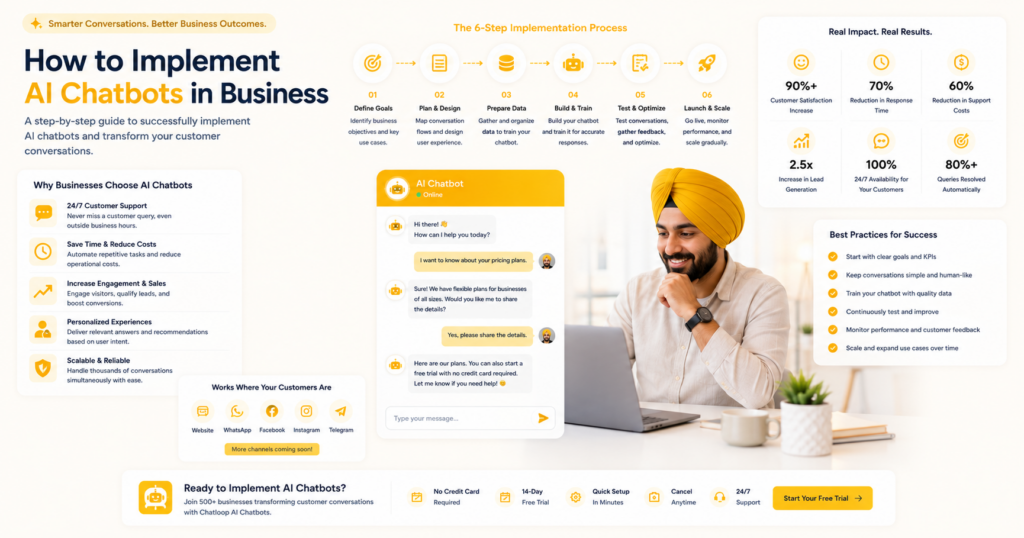
The most common implementation mistake businesses make is treating AI chatbot deployment as a technology project rather than a business process change. Technology projects have launch dates. Business process changes have adoption curves, refinement cycles, and measurable outcomes that take weeks to stabilise. Understanding the difference is what separates deployments that succeed from those that disappoint.
This guide covers the full implementation journey — from making the business case through to sustained performance 90 days after launch — with specific guidance for teams without technical specialists.
Phase 1: Making the Business Case
Before deployment, define what success looks like in commercial terms. "We deployed a chatbot" is not a success metric. "We reduced average first response time from 4 hours to under 30 seconds and increased our CSAT from 3.8 to 4.3 within 90 days" is.
Define your baseline metrics now. Pull your current average first response time, monthly support ticket volume, handling time per ticket, CSAT score if you measure it, and monthly support labour cost. These numbers are your before-picture — without them, you cannot demonstrate the after.
Build your ROI projection. Use the framework at how to calculate AI chatbot ROI to project expected monthly savings and revenue impact based on your query volume and team cost. This projection also helps you set realistic expectations internally — AI chatbots do not eliminate support costs, they reduce them significantly while improving quality.
Identify your stakeholders and their concerns. For most SMBs, implementation touches customer service, sales, operations, and sometimes HR or compliance. Understanding each stakeholder's concerns before deployment — particularly around customer experience quality and team role changes — enables you to address them proactively rather than reactively.
Phase 2: Platform Selection
Select your AI chatbot platform against four non-negotiable criteria: no-code configuration, integration depth, multi-channel support, and analytics quality. See how to automate customer support for the full selection framework.
Chatloop.io is built specifically for business implementation without technical specialists. The platform covers all four criteria, with pre-built integrations for common business tools and a no-code dashboard that any team member can use after a brief orientation.
For a comparison against the main alternatives: chatloop vs Intercom, chatloop vs Tidio, chatloop vs Chatbase.
Phase 3: Knowledge Base Development
The most time-intensive phase and the most important. Your knowledge base quality at launch is the primary determinant of your Day 30 automation rate.
Allocate one to two days to knowledge base development before any technical configuration. This means reviewing your support history, identifying your top 30 query types, drafting accurate answers in customer language, and structuring each entry with the question header, direct answer, supporting detail, and next action format.
This is not a task to rush. A knowledge base built from real query data in the correct format will produce 45-55% automation on day one. A knowledge base assembled quickly from existing website content will produce 20-30%. The difference is worth the extra preparation time. Full guide: how to train an AI chatbot with company data.
Phase 4: Technical Configuration
With your knowledge base ready, technical configuration in chatloop.io is typically completed in one day:
Morning session (2-3 hours): Upload knowledge base entries, configure greeting and identity, set availability and response settings, configure escalation triggers for sensitive keywords.
Afternoon session (2-3 hours): Connect integrations (CRM, e-commerce, calendar), configure conversation flows for your top three use cases, test your top 30 queries and all escalation triggers.
For step-by-step setup guidance: how to set up an AI agent without coding.
Phase 5: Team Preparation
AI chatbot implementation changes how your customer service team works. Managing this change proactively prevents the most common adoption failure mode: team members routing around the AI rather than working with it.
Hold a briefing session before go-live. Explain what the AI handles, what it does not handle, how escalations reach the team, how to review conversation logs, and who owns knowledge base updates. Twenty minutes of briefing prevents weeks of confusion.
Assign a knowledge base owner. One named person is responsible for reviewing failed conversations weekly and keeping knowledge base content current. Without named ownership, this task falls through the cracks and automation rates plateau.
Establish a feedback channel. Create a simple way for team members to flag AI responses they believe are inaccurate or incomplete. This feedback loop accelerates knowledge base quality improvement faster than any other single practice.
Phase 6: Phased Deployment
Week 1 — Soft launch. Deploy on one channel (website chat). Monitor every conversation daily. Address any critical accuracy gaps immediately. Do not publicise the AI capability to customers yet — soft launch with organic traffic only.
Week 2 — Validate and expand. If day-one accuracy is acceptable (85%+ of queries answered relevantly), add your second channel (WhatsApp) and publicise to customers. Continue daily monitoring, shifting to focusing on escalation patterns and knowledge gaps.
Week 3-4 — First optimisation cycle. Review the full first three weeks of conversation data. Add content for the top five unanswered query categories. Adjust escalation thresholds based on observed escalation patterns.
Month 2 — Standard operations. Move from daily to weekly monitoring. Implement the analytics review routine from AI chatbot analytics and optimisation. Target: 55% automation rate by end of month two.
Common Implementation Mistakes
Launching with insufficient knowledge base depth. The most common cause of disappointing Day 30 automation rates. See the knowledge base benchmarks at AI customer support case studies.
Skipping pre-launch testing. Teams that skip structured testing consistently spend their first two weeks firefighting accuracy issues that would have been caught in an afternoon of testing. See how to automate customer support for the test protocol.
Not assigning knowledge base ownership. Without named ownership, knowledge base maintenance stops after the first week and automation rates plateau or decline as products and policies change.
Measuring too early. Many businesses assess AI performance at day 7-14 and conclude it is not working well enough. Meaningful automation rates emerge at day 30-45 as the knowledge base is refined from real query data. Patience in the first month produces significantly better judgments about deployment quality.
Over-scoping the initial deployment. Starting with a narrow, accurate knowledge base and expanding it based on real data consistently outperforms starting with a broad, lower-quality knowledge base. Automate your top 20 queries reliably before expanding to your top 50.
Measuring Implementation Success
| KPI | Week 1 target | Day 30 target | Day 90 target |
|---|---|---|---|
| Automation rate | 35-45% | 50-60% | 60-70% |
| AI CSAT | 3.5/5.0 | 3.8/5.0 | 4.2/5.0 |
| Knowledge gap rate | Under 25% | Under 15% | Under 10% |
| Avg first response | Under 10 sec | Under 5 sec | Under 5 sec |
For the full metrics framework: AI chatbot analytics and optimisation.
FAQ
How much does it cost to implement an AI chatbot in a business? With chatloop.io, the implementation cost is your team's time — the platform itself has no setup fee or professional services requirement. The platform subscription starts at SMB-accessible pricing. See chatloop.io plans for current pricing.
Do we need a developer to implement a chatbot? No. Chatloop.io is designed for implementation by non-technical team members. If you can use a CMS or a spreadsheet, you can configure a chatloop.io deployment.
How do we handle customer resistance to AI support? Ensure human escalation is always immediately available and clearly signposted. Customers who prefer human support should never be forced through an AI-only path. Research shows resistance to AI support is primarily resistance to poor AI support — when the AI answers accurately and escalates gracefully, most customers adapt quickly.
What is the minimum team size for AI chatbot implementation? One person can implement and maintain a chatloop.io deployment. Knowledge base ownership, weekly review, and configuration updates are all manageable by a single team member spending 1-2 hours per week after the initial launch.
How does AI chatbot implementation affect our customer service team headcount? In most SMB deployments, implementation does not result in headcount reduction. It results in headcount redeployment — support team members spend less time on repetitive tier-1 queries and more time on complex cases, retention conversations, and proactive outreach. The team does higher-value work for the same cost.
Implement your AI chatbot the right way. Start your free chatloop.io trial and follow this guide to a successful deployment.


Comments are closed.