


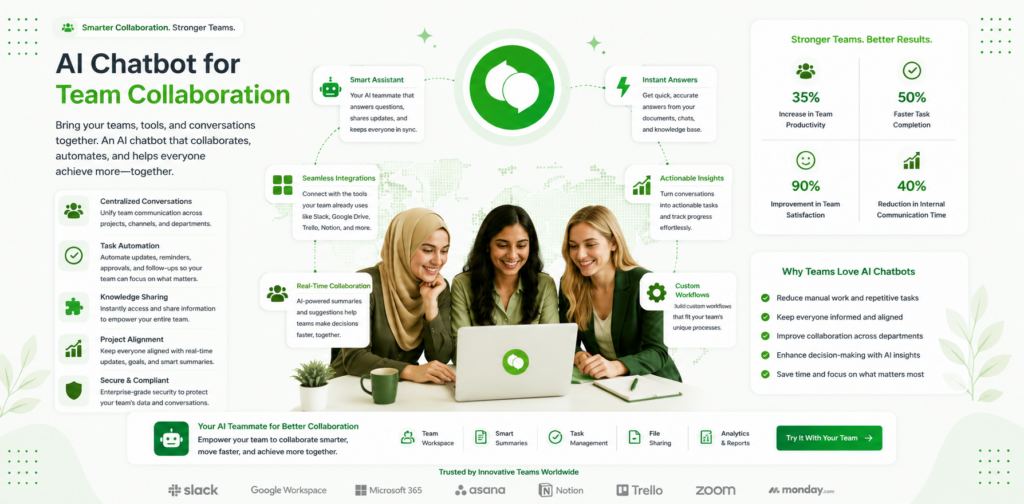
Most conversations about AI chatbots focus on customer-facing deployment — automating support tickets, qualifying leads, and responding to enquiries. But some of the highest-ROI applications are internal. An AI chatbot for team collaboration can eliminate the repetitive questions that slow distributed teams down, surface information instantly, and reduce the low-value meeting load that costs businesses thousands of hours per year.
This guide covers how AI chatbots work for internal team use cases, the specific productivity gains businesses are reporting, and how to deploy your first internal AI assistant without adding complexity to your existing stack.
Why Internal Communication Is Broken for Most Teams
Before deploying AI for customers, consider the friction inside your own organisation. Knowledge is scattered across Slack threads, Google Docs, old email chains, and the memory of the people who have been at the company longest. When a new team member asks "What is our return policy?" or "How do I raise a purchase order?", someone has to stop what they are doing and answer.
Multiply that by a team of 20 people each fielding five such questions per day, and you have 100 interruptions per day — roughly two hours of focused work lost per person per week. For a 20-person team, that is 40 hours per week in accumulated interruption cost.
An AI chatbot trained on your internal documentation answers these questions instantly, any time, without interrupting anyone. The person asking gets a faster answer. The person who would have been interrupted gets their time back. The knowledge is surfaced consistently every time, not interpreted differently by whoever happens to answer.
Core Use Cases for AI Chatbots in Team Collaboration
Internal Knowledge Base Access
The most immediate win for most businesses is connecting an AI chatbot to internal documentation — employee handbooks, process guides, policy documents, onboarding materials, and product specs. Instead of searching through folders or asking colleagues, team members type a question and get an accurate answer drawn directly from the source document.
This use case is particularly valuable for onboarding. New employees who join a 10-person business typically spend their first two weeks asking the same questions that every previous hire asked. An AI assistant with access to onboarding documentation, system guides, and company policies removes this bottleneck entirely and lets new team members become productive faster.
Internal knowledge bases connected to chatloop.io's features allow you to upload existing documentation in multiple formats — PDFs, Word documents, URLs — and have the AI learn from them immediately. No manual tagging or structured data input required.
Workflow Routing and Task Assignment
AI chatbots can act as the first point of contact for internal requests — IT tickets, HR enquiries, approval requests, and expense submissions. Instead of emailing a specific person and waiting for a reply, team members submit to the AI assistant, which classifies the request and routes it to the right person or system automatically.
This is the same escalation and routing logic that works so effectively in customer support automation — applied internally. The AI does not resolve complex requests, but it ensures they reach the right person immediately and with the right context.
Meeting Preparation and Follow-Up
Before any recurring meeting — weekly reviews, project check-ins, client calls — an AI assistant can compile relevant information from the knowledge base, pull outstanding action items, and present a structured briefing. After meetings, it can capture action items, assign them to team members, and send follow-up summaries.
This capability alone eliminates a significant category of low-value coordination work that currently falls on team leaders.
Policy and Compliance Q&A
HR, legal, and compliance questions are high-frequency and high-risk. Team members regularly need to know the answer to questions like "How many days' notice do I need to request leave?", "What expenses are covered under the travel policy?", or "What data can I share with a third-party vendor?".
Human-answered responses to these questions introduce inconsistency risk. An AI chatbot trained on your official policy documents gives the same accurate answer every time, with a reference to the relevant policy section, and flags when the question requires human judgment.
Productivity Gains Businesses Are Reporting
The productivity case for internal AI assistants is compelling across business sizes and industries.
Onboarding acceleration. Businesses using AI-powered internal assistants report reducing new employee time-to-productivity by 20–30%. When new hires can get instant answers to onboarding questions rather than waiting for a colleague to be available, their learning curve compresses.
Meeting frequency reduction. Internal knowledge queries are a significant driver of unnecessary meetings. Teams that deploy AI knowledge assistants report reducing "quick catch-up" meetings by 15–25% because the questions those meetings were answering are now resolved asynchronously.
Support ticket deflection. Internal IT and HR helpdesks handle a high proportion of repetitive tier-1 queries. AI assistants consistently deflect 40–60% of these internally, reducing the load on IT and HR teams who can then focus on higher-complexity work.
Response time improvement for internal requests. Requests that previously waited hours for a colleague to be available are answered in seconds. For distributed and remote teams, this improvement is particularly significant — it removes the timezone dependency from routine information requests.
Deploying an Internal AI Assistant: A Practical Framework
Step 1: Identify your highest-frequency internal queries
Before configuring anything, audit the questions your team asks most often. Review Slack message history, email threads, and helpdesk tickets. The top 20 questions your team asks repeatedly are the foundation of your internal knowledge base.
For most businesses these include: process guides, HR policies, tool access instructions, expense and approval procedures, and product or technical documentation.
Step 2: Structure your knowledge base
Upload your existing documentation to the AI assistant platform. For chatloop.io, this involves uploading files through the dashboard — no technical setup required. The AI learns from the content and is ready to answer questions based on it within minutes.
Prioritise accuracy over volume at this stage. A knowledge base with 20 precisely accurate entries outperforms one with 100 entries of variable quality. Mark documents with their last-updated date so the AI can flag when information may be outdated.
Step 3: Deploy in your team's primary communication channel
The highest-adoption internal AI assistants live where teams already communicate — Slack, Microsoft Teams, or a dedicated internal chat interface. Deploying to a separate tool that team members have to remember to visit significantly reduces usage.
Review chatloop.io's integrations to identify the connection point that fits your existing stack.
Step 4: Communicate the capability to your team
Adoption of internal AI tools follows the same pattern as any new tool: people will not use it if they do not know what it can do. Run a short demo session showing the team what questions the AI can answer, where its knowledge comes from, and how to escalate when it cannot resolve something.
Step 5: Review and expand weekly
In the first month, review the questions the AI could not answer. These are your highest-priority knowledge base additions. Add them, test the responses, and communicate updates to the team. Adoption compounds as team members discover the assistant reliably answers more and more of their questions.
Avoiding the Most Common Internal AI Chatbot Mistakes
Treating it as a search engine. Team members who expect a list of document links rather than a direct answer will be disappointed and stop using it. Set expectations clearly: the AI gives direct answers, not search results.
Neglecting knowledge base maintenance. An internal AI assistant trained on outdated documentation becomes a source of inaccurate information. Assign ownership of knowledge base accuracy — at least one person responsible for reviewing and updating content monthly.
Deploying without escalation paths. Not every internal question should be answered by AI. Complex HR matters, sensitive compliance questions, and anything requiring judgment need clear escalation to a human. Configure these boundaries explicitly before launch.
Over-scoping the initial deployment. Start with the 20 questions your team asks most often. Once those are handled reliably, expand. Trying to automate every internal interaction from day one produces inconsistent results and erodes team trust in the tool.
The Link Between Internal and Customer-Facing AI
There is a natural flywheel between internal and customer-facing AI deployment. The documentation and knowledge base you build for internal use — product specs, policy documents, process guides — is often directly transferable to your customer support AI agent. The same knowledge that helps your team answer questions faster helps your AI agent answer customer questions accurately.
Businesses that start with internal deployment often find that their customer-facing AI is better configured faster — because the knowledge base has already been built, reviewed, and refined by the team before customers ever see it.
Measuring the ROI of Internal AI Collaboration
Unlike customer-facing AI, where ROI is measured in ticket deflection rates and cost per resolution, internal AI ROI is measured in time recovered.
Track these metrics before and after deployment:
- Average time spent answering internal queries per team member per week
- Frequency of "quick sync" meetings (a proxy for unresolved knowledge gaps)
- New employee time-to-first-productive-week
- IT and HR ticket volume for tier-1 queries
For most businesses with 10+ employees, recovering even two hours per week per person across the team represents significant operational value. A 20-person team recovering two hours each per week at a blended rate of £20/hour recovers £800/week — over £40,000/year from one internal AI deployment.
Explore chatloop.io's pricing to understand the cost at which this return becomes available.
FAQ
Can an AI chatbot access confidential HR or legal documents safely? Yes, provided the platform has appropriate access controls. With chatloop.io, you control which documents are accessible to which users. Confidential documents can be restricted to specific roles while general policy documents remain accessible to all.
How does an internal AI assistant handle questions it cannot answer? The AI should be configured to acknowledge when a question falls outside its knowledge base and provide a clear escalation path — either a named contact, a form to submit, or a specific channel to use. Never leave team members with a dead end.
Will team members resist using an AI for internal queries? Initial resistance is common but typically resolves quickly when team members discover the AI answers accurately and instantly. Adoption accelerates in remote and distributed teams where the alternative is waiting hours for a colleague in a different timezone to respond.
How long does it take to set up an internal AI assistant? With chatloop.io's no-code interface, initial deployment with 20–30 knowledge base entries takes four to six hours. The assistant is answering questions accurately on day one. See how to set up an AI agent without coding for a full step-by-step walkthrough.
Can the same chatloop.io agent serve both internal and external queries? Yes. You can configure separate agents with different knowledge bases and access permissions for internal and customer-facing use, both managed from the same dashboard.
Ready to recover 40+ hours a week across your team? Deploy your internal AI assistant with chatloop.io today — start your free 7-day trial.

Comments are closed.