


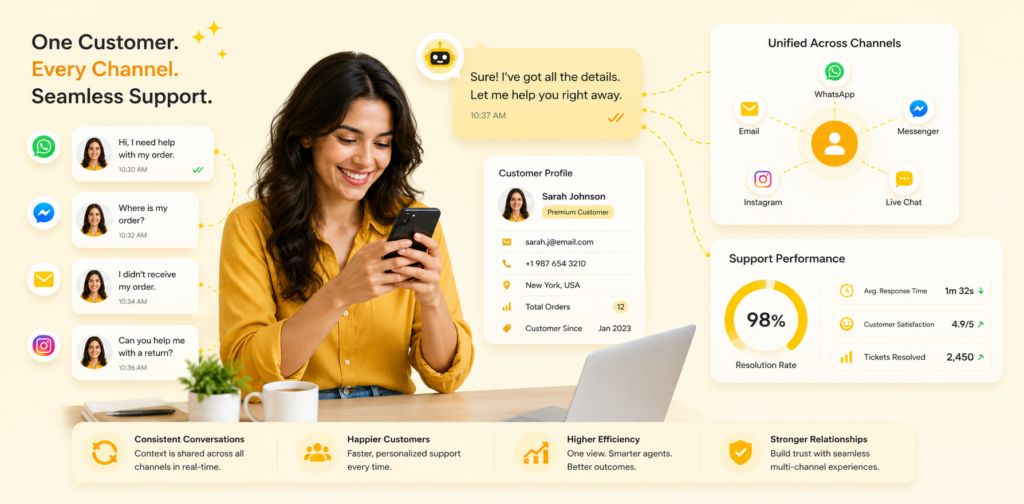
Today's customers reach out wherever they're comfortable: email, chat, social media, phone, SMS. Yet most support teams operate in silos—separate tools for each channel, disconnected conversations, and customers frustrated by repeating themselves.
Multi-channel customer support integration solves this fundamental problem. By unifying all customer conversations into a single view, context flows automatically, agents see complete customer history, and customers get consistent service regardless of how they reach you. This comprehensive guide explores how leading companies are breaking down channel silos to deliver superior customer experiences while dramatically improving agent efficiency.
The Multi-Channel Reality
How Customers Communicate
Modern customers expect flexibility. 45% start conversations via email but may continue on chat. 30% use social media first, then expect seamless transition to phone support. 25% begin with self-service, then escalate to human support through different channels. Customers rarely think in terms of "channels"—they think in terms of conversations. Yet most support teams organize around channels, creating fragmentation.
The Current Problem
Disconnected systems mean: customers repeat information across channels, agents lack complete context, conversations get lost in queue transitions, quality suffers inconsistently, and operational inefficiency persists.
How Integration Works
The Technical Architecture
Modern multi-channel integration works through several layers:
Channel Connectors link each communication platform (Gmail, Facebook, WhatsApp, Slack) to a central platform. Unified Customer Profiles merge data across channels so one customer has one record. Conversation Threading connects related conversations across channels. Smart Routing directs inquiries to appropriate agents or automated responses. Context Sharing passes complete conversation history when escalating or transferring.
Real-World Workflow
Customer sends email asking about product availability. Agent sees the customer's 3 previous chats, their purchase history, and previous support interactions. Agent responds with personalized context. If customer replies via chat instead of email, the same agent or any team member sees full conversation. If escalation happens, the receiving agent has everything they need.
Implementation Strategy: 6-Week Roadmap
Week 1: Audit & Plan
Map all current support channels and tools. Count volume per channel. Identify pain points in current workflow. Survey team on biggest frustrations. Document customer journey across channels. Result: Clear understanding of current state.
Week 2: Select Platform
Choose unified support platform. Key criteria: connects all your channels, has customer history integration, supports your workflow. Typical platforms: Zendesk, Intercom, Freshdesk, Gorgias (for e-commerce).
Week 3: Data Migration
Migrate historical conversations to unified platform. This usually includes 6-12 months of history. Set up integrations with each channel. Test that messages flow correctly. Ensure customer data consolidation works.
Week 4: Team Training
Train team on new system. Show how to see customer history. Demonstrate multi-channel workflow. Practice common scenarios. Build confidence and buy-in.
Week 5: Soft Launch
Go live with one channel (usually chat). Monitor for 3-5 days. Gather feedback. Fix issues. Gradually add other channels.
Week 6: Full Deployment
All channels live. Continuous monitoring. Weekly team feedback. Plan optimizations.
Channel-Specific Integration
Email Integration
Email remains the most common support channel. Modern integration means emails appear in unified inbox alongside chat and social. Agents reply through unified interface. Auto-categorization sorts by topic. Templates reduce response time.
Live Chat Integration
Chat provides real-time interaction for immediate issues. Unified integration means chat conversations appear in same interface as email, with full customer history visible. If escalation needed, customer transfers to email or phone with context intact.
Social Media Integration
Social media complaints are public. Unified integration means agent sees the customer's support history when responding to Facebook complaint or Twitter mention. Response stays faster, context-aware, and personalized.
SMS/Texting
Text messaging reaches customers where they are. Unified integration means SMS conversations thread with other support interactions. One customer has one conversation record, not fragmented across channels.
Phone Support
Inbound calls benefit from unified customer profiles. When customer calls, their account appears with all recent support tickets, previous issues, and escalation history. Phone agents resolve faster with better context.
Real-World Cases
Case Study 1: SaaS Company (50 agents)
Pre-Integration: Separate tools for email, chat, social. Agents got 30% of customer history. Repeated information common. Average handle time: 12 minutes.
Post-Integration: All channels unified. Complete customer history visible. Better routing. Average handle time: 8 minutes (-33%).
Results:
- Customer satisfaction: 72% → 84%
- First-contact resolution: 65% → 78%
- Agent productivity: +35%
- Cost savings: $80,000/year
Case Study 2: E-Commerce (25 agents)
Pre-Integration: Customers had different experiences via email vs. chat vs. phone. Returns process had different steps per channel.
Post-Integration: Unified process. Customer can start returns via chat, continue via email, complete via portal. Data flows automatically.
Results:
- Return processing time: 8 hours → 2 hours
- Customer satisfaction: 68% → 82%
- Support team satisfaction: improved significantly
Case Study 3: Professional Services (35 agents)
Pre-Integration: Complex sales inquiries fragmented across email, phone, chat, LinkedIn messages. No holistic view of prospect journey.
Post-Integration: All touchpoints unified. Sales team can see marketing interactions, support inquiries, everything together.
Results:
- Sales cycle accelerated: 25% faster closure
- Customer context: complete vs. fragmented
- Team collaboration: significantly improved
Best Practices
1. Design Around Customer Journey
Structure your support around how customers actually interact, not how your organization is structured. If a customer typically starts with FAQ search, then email, then phone, design that flow seamlessly.
2. Implement Gradually
Start with one or two channels. Get the workflow optimized. Then add others. Don't try to integrate email, chat, social, phone, SMS, and API all at once.
3. Maintain Channel Preferences
Some customers prefer email. Others chat. Unified systems should let customers choose while keeping support team efficiency.
4. Train Team Thoroughly
New systems require training. Emphasize benefits (better context, easier work, more satisfying interactions). Address concerns. Provide ongoing support.
5. Measure and Optimize
Track metrics before and after integration. Look for improvements in resolution time, customer satisfaction, agent satisfaction. Adjust based on data.
Metrics That Matter
| Metric | Impact |
|---|---|
| First-Contact Resolution Rate | Higher when agents have complete history |
| Average Handle Time | Decreases 20-30% with unified interface |
| Customer Satisfaction | Increases 10-15 points with seamless experience |
| Agent Satisfaction | Improves significantly (less frustration) |
| Operational Cost | Typically decreases 20-40% with efficiency gains |
Comparison: Integrated vs. Siloed Support
| Aspect | Integrated | Siloed |
|---|---|---|
| Customer History | Complete | Fragmented |
| Handle Time | Lower | Higher |
| Context | Rich | Limited |
| Team Coordination | Easy | Difficult |
| Customer Experience | Seamless | Frustrating |
| Scalability | Easy | Complex |
Getting Started
Week 1: Assessment
- List all current support channels
- Count volume per channel
- Identify top pain points
- Survey team
Week 2-3: Selection
- Evaluate platforms
- Request demos
- Compare costs
- Make selection
Week 4-5: Implementation
- Set up integrations
- Migrate data
- Train team
- Test thoroughly
Week 6: Launch
- Soft launch one channel
- Monitor and adjust
- Add additional channels
- Optimize ongoing
Conclusion
Multi-channel customer support integration is no longer nice-to-have—it's essential. Customers expect seamless experiences regardless of channel. Teams need unified interfaces to operate efficiently. Integration solves both, leading to better customer outcomes and happier support teams.
Most organizations implementing integration see 20-40% improvement in efficiency and 10-15 point improvement in customer satisfaction within 90 days.
Next Steps
- Audit your current channels - identify fragmentation points
- Calculate integration ROI - use typical efficiency gains
- Request platform demos - see how integration works
- Plan pilot - start with 2-3 channels
- Create implementation timeline - 6-8 weeks typical
Ready to deliver truly seamless support? Start with a platform demo and see how unified conversations transform your customer experience.



Comments are closed.