


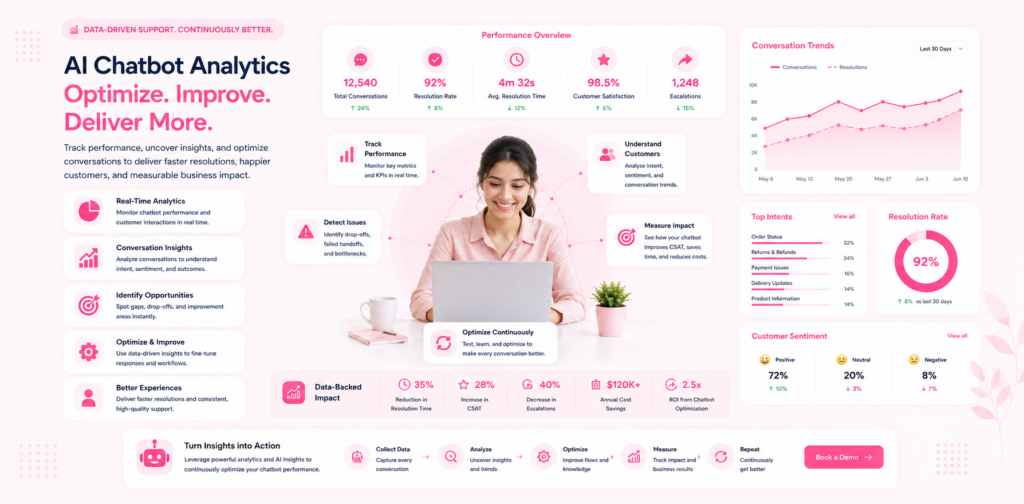
Deploying an AI chatbot is not a one-time event. The businesses that report the highest automation rates, the strongest customer satisfaction scores, and the most measurable ROI are not those with the most sophisticated initial configuration. They are those with the most disciplined ongoing optimisation practice.
This guide covers the specific metrics that matter for AI chatbot performance, how to read your conversation data to identify improvement opportunities, and the weekly and monthly review routine that compounds your results over time. Apply this framework and your automation rate will improve every month rather than plateauing after the initial deployment.
The Core Metrics That Matter
There are dozens of potential chatbot metrics. Most of them are interesting. A small number of them are actionable. Focus your weekly review on the actionable set.
Automation Rate
Definition: The percentage of all incoming conversations that the AI resolves without human involvement.
Why it matters: Automation rate is the primary ROI driver. Every percentage point improvement translates directly to time saved and cost reduced. It is also the most direct indicator of knowledge base quality.
Target: 55–65% at 60 days; 65–75% at 120 days for a well-maintained knowledge base.
How to improve it: Review escalated conversations weekly. The queries that escalated to a human are your highest-priority knowledge base additions. Add content to address the top five escalation reasons each week.
Escalation Rate by Category
Definition: The percentage of conversations in each query category that escalate to a human.
Why it matters: Overall automation rate tells you how you are doing in aggregate. Category escalation rate tells you where the specific gaps are. A 60% overall automation rate with 90% escalation on shipping queries and 30% escalation on returns queries means your shipping knowledge base needs urgent attention.
Target: Under 20% escalation rate for mature query categories.
How to improve it: For categories with high escalation rates, review every escalated conversation in that category for the past two weeks. The pattern of unanswered queries in that category reveals exactly what to add.
Average First Response Time
Definition: The average time between a customer sending their first message and the first AI response.
Why it matters: Speed is the most impactful dimension of customer experience. Your AI should be responding in under five seconds. If it is not, there may be a configuration or integration issue to investigate.
Target: Under 3 seconds for AI-handled conversations.
Customer Satisfaction Score (CSAT)
Definition: Post-conversation satisfaction ratings, typically collected through a brief feedback prompt at the end of AI conversations.
Why it matters: An AI chatbot that automates 70% of queries but produces 50% CSAT is not a success. High automation AND high satisfaction is the target.
Target: 4.0/5.0 or above for AI-handled conversations. If your CSAT is below 4.0, accuracy or completeness issues in your knowledge base need urgent attention.
How to improve it: Review low-rated conversations specifically. The pattern of dissatisfied customers reveals whether the issue is accuracy (the AI gave wrong information), completeness (the AI's answer was too partial), or escalation failure (the AI should have transferred to a human but did not).
Escalation Satisfaction Score
Definition: Post-conversation CSAT for conversations that escalated from AI to human.
Why it matters: If customers who escalated to a human are significantly less satisfied than those resolved by AI, the escalation experience needs attention. Either the handoff is too slow, the human agent does not have enough context, or the escalation triggers are firing too late — after the customer is already frustrated.
Target: Within 0.3 points of your overall CSAT.
Knowledge Gap Rate
Definition: The percentage of conversations where the AI explicitly acknowledges it cannot answer the query.
Why it matters: This metric directly identifies knowledge base gaps. A high knowledge gap rate means your knowledge base coverage is insufficient for your actual query mix.
Target: Under 10% of all conversations should hit a knowledge gap.
How to Read Your Conversation Data
Raw conversation logs are where the most actionable optimisation insights come from. The challenge is reading them efficiently when your chatbot handles hundreds of conversations per week.
The Escalation Queue Analysis
Every week, pull the conversations that escalated to a human in the previous seven days. Sort them by the point in the conversation where escalation occurred — early escalations (within the first two exchanges) are different from late escalations (after several AI attempts).
Early escalations often indicate missing query categories — the customer's very first message is about a topic the AI has no knowledge base coverage for. These are the highest-priority additions.
Late escalations often indicate incomplete knowledge base entries — the AI has some relevant content but not enough to resolve the query fully. Expand these entries rather than creating new ones.
For each top escalation reason, write or update the relevant knowledge base entry the same day you identify it. The faster you close gaps, the faster your automation rate improves.
The Low-CSAT Conversation Audit
Pull conversations from the past two weeks rated 3/5 or below. Read these conversations in full. Look for:
Accuracy failures: The AI provided factually incorrect information. This is the highest-priority issue — update the knowledge base entry immediately and verify the correction with a test query.
Completeness failures: The AI answered part of the question but not all of it. The customer had to ask follow-up questions that the AI still could not fully resolve. Expand the relevant entry to cover the complete answer including common follow-up questions.
Tone failures: The AI's response was technically correct but felt robotic, dismissive, or unhelpful in tone. Review your response templates and adjust where identified.
Wrong escalation decisions: The AI attempted to answer when it should have escalated, or escalated when it could have answered. Adjust your escalation trigger thresholds based on the pattern.
The Knowledge Gap Review
Filter conversations to show only those where the AI explicitly said it could not answer or did not recognise the query. Group these by topic. The most common topics in this filter are your knowledge base priority list for the week.
The Optimisation Routine
Consistent improvement comes from consistent process. Here is the weekly and monthly routine used by the highest-performing chatloop.io deployments.
Weekly Review (60 minutes)
Monday morning:
- Pull automation rate for the previous week and compare to the week before.
- Review top five escalation reasons — add or update the relevant knowledge base entries.
- Review top three low-CSAT conversations — identify and fix the root cause.
- Check knowledge gap rate — if above 10%, identify and address the highest-frequency gaps.
Friday afternoon:
- Test five queries that were recently added to the knowledge base. Verify the AI's responses are accurate.
- Check for any product or policy changes in the past week that require knowledge base updates.
- Review the escalation queue one more time for anything missed in the Monday review.
Monthly Deep Review (2–3 hours)
First week of the month:
- Full automation rate trend analysis for the past 30 days. Is it improving, stable, or declining? Declining automation rate without volume increase indicates knowledge base drift — content has become outdated.
- CSAT trend analysis by query category. Identify any category where satisfaction is declining and investigate the root cause.
- Escalation rate by category trend. Categories where escalation rate is not improving need dedicated knowledge base investment this month.
- Review knowledge base entries that have not been updated in the past 60 days. Are they still accurate? Have the relevant products, policies, or processes changed?
Content expansion plan: Based on the monthly review, identify five to ten new knowledge base topics to add this month. Prioritise based on escalation frequency and business value.
Advanced Optimisation: Beyond the Basics
Once your automation rate is above 60% and CSAT is above 4.0/5.0, the optimisation focus shifts from gap-filling to refinement.
Response Quality Optimisation
At this stage, your AI can answer most questions correctly. The optimisation opportunity is in how it answers them — precision, tone, and the quality of follow-up question handling.
Review conversations where customers expressed explicit satisfaction (responded positively, said "thank you", or rated 5/5) and conversations where they expressed mild dissatisfaction (rated 3/5 but did not escalate). The differences between these conversations — in question phrasing, response structure, or context — reveal refinement opportunities.
Conversion Optimisation
For customer-facing deployments, track whether AI conversations result in the commercial outcomes you care about: leads captured, bookings made, sales completed. Low conversion even with high CSAT means the AI is answering questions effectively but not creating commercial momentum.
Add proactive prompts at relevant points in high-intent conversations — a visitor asking pricing questions is a candidate for a trial offer; a visitor asking about features is a candidate for a demo booking. These prompts should feel natural within the conversation, not like a hard sell.
A/B Testing Response Variants
For your highest-volume query categories, test two different response formats and measure CSAT differences. A response that lists information in bullet points may outperform one in paragraph format, or vice versa, for a specific query type. The data tells you which format your customers prefer for each category.
Using Analytics to Build the Business Case for AI Expansion
Analytics data is not just for internal optimisation — it is your evidence base for expanding AI investment.
When your analytics show 65% automation rate, 4.3/5.0 CSAT, and £1,800/month in calculated labour saving, you have a compelling internal business case for expanding to a new channel (WhatsApp), adding a new use case (lead qualification), or increasing knowledge base investment to push automation toward 75%.
Present these figures alongside the AI chatbot ROI calculation framework to justify continued AI investment to stakeholders who want evidence before approving budget.
FAQ
How long does it take for automation rate to stabilise after deployment? Most deployments see automation rate improve steadily for the first 90 days as knowledge base gaps are closed. Stabilisation typically occurs at 90–120 days, after which the improvement pace slows from weekly gains to monthly incremental progress.
What should I do if CSAT drops suddenly? A sudden CSAT drop is almost always caused by a specific, identifiable event — a product or policy change that made knowledge base content inaccurate, a high-volume query type that the AI is handling incorrectly, or an integration failure causing the AI to provide incorrect real-time data. Pull the low-CSAT conversations from the days immediately after the drop and the root cause will typically be apparent.
Can I benchmark my chatbot's performance against industry averages? Industry benchmarks for AI chatbot performance are covered in the state of AI customer service in 2025. The 2025 median automation rate for SMB deployments is 52% — if you are above this after 60 days, you are performing above average.
How many people should be involved in the weekly review? For most SMBs, the weekly review takes one person 60 minutes. It should be the person who is closest to the customer queries — a support team lead, operations manager, or the business owner. A second person reviewing low-CSAT conversations is beneficial but not essential.
What tools does chatloop.io provide for analytics? Chatloop.io's dashboard provides automation rate, CSAT, response time, escalation rate, and conversation logs through the built-in analytics section. For broader business intelligence integration, see the features page and integrations for current export and connection options.
Build a chatbot that gets better every month. Start your free chatloop.io trial and begin your first analytics review on day seven.#



2 Responses on this post