



Customer support is one of the most resource-intensive functions in any business. Every hour your team spends answering the same FAQ for the 50th time is an hour not spent on high-value work — and every customer who waits 4 hours for an answer is a customer who might not come back.
Automating customer support doesn't mean removing human care from the experience. It means deploying technology to handle repetitive, answerable queries instantly — so your human team can focus on the complex, nuanced interactions that genuinely require their skills.
This guide shows you exactly how to do it.
What Can (and Can't) Be Automated
Before building anything, be honest about the limits.
High Automation Potential (automate first)
- FAQ answers (opening hours, pricing, policies)
- Order status and tracking
- Password resets and account queries
- Product information requests
- Initial lead qualification
- Appointment availability and booking
- Onboarding guidance
Medium Automation Potential (automate with oversight)
- Returns and refund initiation
- Technical troubleshooting (tier 1)
- Plan upgrades and downgrades
- Complaint acknowledgement and routing
Low Automation Potential (keep human)
- Complex, multi-step technical issues
- High-value customer escalations
- Emotional complaints requiring empathy
- Negotiation and retention conversations
- Legal or compliance-sensitive queries
The goal is not 100% automation. A realistic target for most businesses is 40–60% of conversations handled fully by automation, freeing human agents for the remaining 40–60% that genuinely need them.
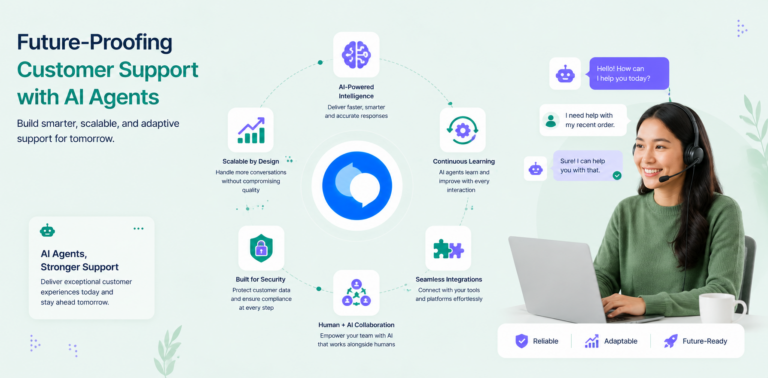
The Three Pillars of Customer Support Automation
Pillar 1: AI-Powered Conversation
An AI agent handles the first response — understanding customer intent, pulling from your knowledge base, and resolving straightforward queries without human involvement.
Pillar 2: Smart Routing
When automation can't fully resolve an issue, intelligent routing directs the conversation to the right human — by topic, urgency, customer tier, or team availability — rather than dumping everything into one inbox.
Pillar 3: Human-in-the-Loop Escalation
A seamless handoff from AI to human that preserves conversation context. The agent doesn't make the customer re-explain their problem from scratch.
All three pillars must work together. Automation without smart routing creates chaos. Smart routing without a seamless handoff creates frustration.
Step-by-Step: How to Automate Customer Support
Step 1: Audit Your Current Support Volume
You cannot automate effectively without data. For one week, track:
- Total number of support enquiries
- Breakdown by type (billing, technical, general, complaints)
- Average response time per type
- Average resolution time per type
- Team hours spent per type
This audit reveals three things:
- Which types are highest volume (automate these first)
- Which types take disproportionate time (automate these for efficiency)
- Which types are genuinely complex (leave these for humans)
Step 2: Document Your Answers
Before any AI can help customers, it needs to know your answers. The single biggest bottleneck in support automation projects is poor or missing knowledge documentation.
For each support category, document:
- The standard answer
- Edge cases and exceptions
- When to escalate (and to whom)
- Relevant links or resources to share
Format this as a clean FAQ document. Aim for 30–50 entries minimum. Plain language works better than marketing copy — the AI needs to understand it and communicate it clearly.
Step 3: Choose Your Automation Stack
You don't necessarily need a single platform to do everything. Many businesses use a combination:
| Layer | Tool Type | Examples |
|---|---|---|
| AI conversation | AI agent platform | Chatloop, Intercom, Tidio |
| Help centre | Knowledge base tool | Notion, Intercom Articles |
| Ticket management | Helpdesk | Zendesk, Freshdesk |
| Routing & workflows | Automation | Zapier, Make.com |
| Communication | Multi-channel | WhatsApp Business API |
For small-to-medium businesses, an all-in-one AI agent platform like Chatloop handles most of this natively — reducing the need to stitch together multiple tools.
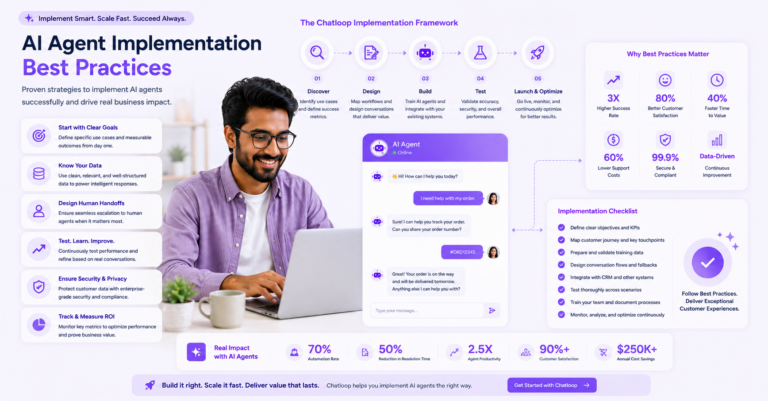
Step 4: Set Up Your AI Agent
With your documentation ready, configure your AI agent:
4a. Upload your knowledge base All your FAQ content, policy documents, and product information.
4b. Set response parameters
- Confidence threshold: When should it answer vs. escalate?
- Tone: Match your brand voice
- Scope: What topics should it address and which should it immediately escalate?
4c. Create escalation triggers Define the specific conditions that route to a human:
- Conversation topic (e.g., complaints always go to human)
- Customer keyword triggers ("cancel my account" → human)
- Confidence threshold not met
- Customer explicitly requests human
4d. Configure your team inbox Ensure all escalated conversations land in a monitored inbox with clear ownership. Unmonitored escalation is worse than no automation — it creates the impression of help while delivering none.
Step 5: Implement Across All Relevant Channels
Don't automate just one channel if customers contact you through multiple.
Priority channels to automate (in order of typical ROI):
- Website live chat — highest volume, easiest to deploy
- WhatsApp — critical if you serve markets where WhatsApp is primary
- Email — auto-categorisation, acknowledgement, and FAQ responses
- Social media DMs — for businesses with active social support
Consistency across channels matters. Customers who get instant AI support on chat but a 6-hour wait on WhatsApp will use the comparison unfavourably.
Step 6: Train Your Human Team for the New Model
Automation changes your human agents' roles — not eliminates them. Prepare your team for the shift:
Old model: Handle every enquiry from first contact to resolution New model: Focus exclusively on complex, escalated, high-value conversations
Train your team on:
- How to pick up escalated conversations with full context
- How to close a handoff conversation correctly (so the AI can reactivate for follow-up)
- How to identify knowledge gaps to feed back into the knowledge base
- How to flag automated responses that were incorrect
Your human team becomes the quality control layer and the specialist responders — a more skilled, more valuable role than answering the same FAQ repeatedly.
Step 7: Monitor, Measure, and Improve
Metrics to track from day one:
| Metric | Definition | Target |
|---|---|---|
| Automation rate | % of conversations resolved without human | 40–60% |
| First response time (AI) | Time from message to first AI response | <10 seconds |
| First response time (human) | Time from escalation to human response | <2 hours |
| Escalation rate | % of AI conversations that escalate | <30% |
| Resolution rate | % of conversations where customer got their answer | >75% |
| CSAT | Customer satisfaction rating | >80% |
| Deflection value | Cost saved per automated resolution | Calculate monthly |
Weekly review ritual:
- Check automation rate — is it stable or declining?
- Review escalation reasons — what's driving handoffs?
- Review top 5 unanswered questions — add to knowledge base
- Flag any incorrect AI responses for correction
Automation That Feels Human
The most common objection to support automation is: "Our customers want to talk to a real person."
This concern is partly valid and largely solvable.
What customers actually dislike:
- Waiting too long for a response (automation fixes this)
- Getting the wrong answer (quality knowledge base fixes this)
- Being stuck with no way to reach a human (escalation path fixes this)
- Feeling like their issue isn't understood (conversational AI fixes this)
What customers genuinely prefer about automation:
- 24/7 availability
- Instant responses
- No hold music
- Consistent, accurate answers
The experience of AI customer support has improved dramatically. With a well-configured system, most customers don't need to know — or care — that they're talking to an AI. They got their answer in 30 seconds. That's the goal.
Cost Savings: A Real Calculation
A typical 5-person e-commerce support team handles 200 tickets/day at an average of 5 minutes per ticket = ~16.7 hours of labour per day.
With 50% automation:
- 100 tickets resolved by AI = 0 labour hours
- 100 tickets handled by humans = ~8.3 hours
- Labour saved: 8.3 hours/day = ~41.5 hours/week
- At £15/hour: ~£625/week saved = £2,700/month
- Minus AI platform cost (~£99/month): Net saving: ~£2,600/month
This is a conservative model. Higher automation rates — achievable with good knowledge base management — produce proportionally larger savings.
FAQ
Q: Will customers be unhappy talking to an AI? A: Research consistently shows customers prioritise speed and accuracy over whether they're talking to a human. If the AI answers correctly and quickly, satisfaction is high.
Q: What happens to my support team? A: They shift from repetitive FAQ answering to higher-value work: complex issues, retention conversations, and proactive customer success. Job satisfaction typically improves.
Q: How quickly can I see results? A: Most businesses see measurable automation rates within the first week of going live. Optimised performance is typically achieved in 4–8 weeks.
Q: What if the AI gives a wrong answer? A: Set a confidence threshold so the AI escalates when uncertain rather than guessing. Review conversation logs weekly to catch and correct errors.
Q: Is customer data safe with AI support tools? A: Choose GDPR-compliant platforms with data processing agreements. Reputable providers (like Chatloop) offer enterprise-grade encryption and data residency options.
Conclusion
Automating customer support is one of the highest-ROI investments a growing business can make. It reduces response times from hours to seconds, cuts operational costs, and frees your team for work that actually requires human expertise.
The businesses winning at customer experience right now aren't necessarily spending more on support — they're spending smarter. Automation handles the volume; their team handles the value.
The best time to start was six months ago. The second best time is today.
Try Chatloop free and automate your first 50 conversations this week.



9 Responses on this post
Comments are closed.