


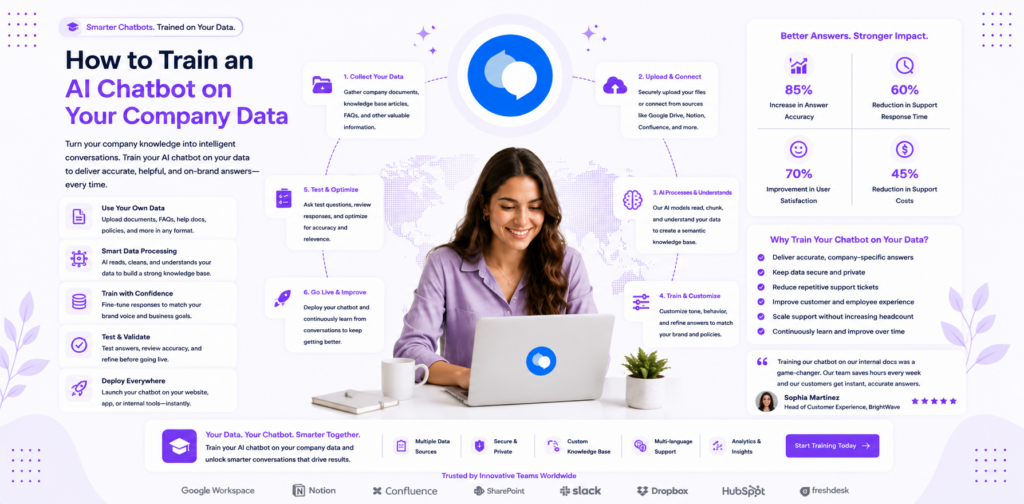
The quality of an AI chatbot is almost entirely determined by the quality of its training data — not the sophistication of the underlying language model. A well-configured knowledge base built from accurate company data will outperform an out-of-the-box AI running on generic content every time.
This guide walks you through every step of training an AI chatbot with your own company data: from structuring your knowledge base to handling edge cases, validating accuracy, and expanding coverage over time. By the end, you will have a clear methodology for achieving 60%+ automation rates from your first month of deployment.
Why Training Quality Determines Everything
When businesses report disappointing chatbot results — low automation rates, frustrated customers, inaccurate responses — the root cause is almost always a poorly structured knowledge base rather than a platform limitation.
An AI chatbot trained with 15 generic FAQ entries will automate 15–20% of queries at best. An AI chatbot trained with 80 well-structured, accurate knowledge base entries covering your specific products, policies, and processes will automate 55–70% of queries within 60 days. The technology is the same. The difference is the training data.
Understanding this distinction is the most important thing you can do before deploying AI. The platform — whether you use chatloop.io or any other — is the vehicle. The knowledge base is the engine.
Step 1: Audit Your Existing Documentation
Before uploading anything, conduct a documentation audit. The goal is to identify what you have, assess its accuracy, and decide what belongs in the knowledge base.
Sources to review:
- Customer support email history (last 90 days of queries and responses)
- FAQ pages on your website
- Product documentation and spec sheets
- Policy documents (returns, refunds, shipping, warranties)
- Employee onboarding materials
- Help centre articles if you have a helpdesk platform
- Recorded responses to common enquiries in your CRM
Sort by frequency and completeness. Pull your top 50 most-asked customer queries from your support history. These are your non-negotiable knowledge base entries. If a query appears ten or more times in your support logs, it must be covered.
For each query on your list, check whether existing documentation covers it accurately. Flag gaps where the documentation either does not exist or is out of date.
Step 2: Structure Your Knowledge Base Entries
The format of your knowledge base entries directly affects how accurately the AI retrieves and presents information. Poorly formatted entries — very long paragraphs, ambiguous phrasing, jargon-heavy language — produce inconsistent responses. Well-structured entries produce precise, useful answers.
The Optimal Entry Structure
Each knowledge base entry should follow this format:
Question or topic header — The phrasing that captures how customers actually ask this question. Use natural language, not internal terminology.
Direct answer — The answer in two to four sentences. Prioritise the most important information first. Avoid leading with caveats or qualifications.
Supporting detail — Additional context, conditions, or exceptions. This section is what the AI draws from when answering follow-up questions.
Reference or action — Where to go for more information, or what the customer should do next.
Example Entry (Correct Format)
Topic: Returns policy — eligible items Direct answer: Items purchased within the last 30 days can be returned for a full refund if they are unused and in original packaging. Clearance items are not eligible for return. Supporting detail: To initiate a return, the customer needs their order number and the email address used at purchase. Return shipping is free for UK orders. International returns are at the customer's cost. Reference: Start a return at [your returns portal URL] or contact support via chat.
This structure gives the AI specific, accurate content to draw from and ensures it answers both the primary question and common follow-ups without needing to escalate.
Step 3: Prepare Your Source Documents
Chatloop.io's knowledge base accepts multiple document formats including PDFs, Word documents, plain text files, and URLs. Each format has practical considerations.
PDFs — Suitable for policy documents, product specs, and formal documentation. Ensure text is selectable (not scanned images). Multi-column layouts can cause parsing issues; single-column formats are more reliable.
Word documents (.docx) — Well-suited for FAQ content and process guides. Use clear headings (H2, H3) to help the AI identify distinct topics within a single document.
Plain text files (.txt) — Fastest to process and most reliable for parsing. Good for straightforward FAQ lists and policy summaries.
URLs — Connect the AI to live web pages on your site. The AI crawls and learns from the content. Best for documentation that updates regularly, as changes on the page are reflected in AI responses after re-crawling.
Recommendation: Convert long PDFs with multiple topic sections into separate shorter documents. A single 50-page employee handbook parsed as one document is harder for the AI to navigate than ten 5-page focused guides covering specific topics.
Step 4: Upload and Organise Your Knowledge Base
With your documents prepared, the upload process in chatloop.io is straightforward. Navigate to the knowledge base section of your dashboard, upload your prepared files, and the platform processes them automatically.
Organise by topic category. Group related entries together — all returns-related content in one section, all shipping content in another, all product specs together. This organisation helps with both human maintenance and AI retrieval accuracy.
Add custom Q&A pairs. Beyond uploaded documents, add direct Q&A pairs for your most common queries. These are given high priority by the AI and produce the most consistent responses. Start by creating explicit Q&A entries for your top 20 customer questions.
Set document priorities. When multiple documents contain information on the same topic, configure priority so the most current and authoritative source takes precedence. This prevents the AI from surfacing outdated information from an older document alongside accurate information from a current one.
Step 5: Test Before Going Live
Testing is the step most businesses skip — and the reason many deployments underperform in the first weeks. Before exposing the AI to real customer queries, put it through a structured test protocol.
Create a test query set. Write out your top 30 customer queries in the exact phrasing customers typically use. Include variations — the same question asked in five different ways is a valid test of whether the AI understands intent rather than just matching keywords.
Test for accuracy. Run each query and compare the AI response to the correct answer. Flag any response that is inaccurate, incomplete, or misleading. These flagged responses map directly to knowledge base gaps that need to be fixed before launch.
Test edge cases. What happens when a customer asks a question outside the knowledge base? The AI should acknowledge it cannot answer rather than guessing. Test this explicitly by asking questions you know are not in the knowledge base and verifying the escalation behaviour.
Test escalation triggers. Confirm that sensitive keywords (complaint, refund, cancel, lawyer) trigger the configured escalation to a human agent. For guidance on configuring escalation correctly, see how to automate customer support.
Step 6: Monitor and Expand After Launch
Training is not a one-time activity. The most important phase of knowledge base development happens after launch, when real customer queries expose the gaps that test scenarios did not anticipate.
Review failed conversations weekly. Chatloop.io provides conversation logs showing where the AI could not answer or where customers escalated. These failed conversations are the highest-priority content to add to your knowledge base. Review them every week without exception in the first 60 days.
Track automation rate by topic. Break down your automation rate by query category. If general FAQ queries are automating at 75% but shipping queries are only automating at 30%, your shipping knowledge base section needs expansion.
Add content proactively. When your product, policy, or process changes, update the knowledge base before the change takes effect. This prevents a window of inaccurate responses while you catch up to customer queries about the change.
Set a quarterly review. Every three months, audit the full knowledge base for accuracy. Remove outdated entries, update information that has changed, and add entries for new products or services.
Common Training Mistakes and How to Avoid Them
Uploading raw, unedited documents. A 40-page terms and conditions document uploaded as a single file produces inconsistent, hard-to-parse responses. Break it into topic-focused sections first.
Using internal jargon. If your knowledge base uses internal product codes or team-specific terminology that customers do not use, the AI will not match their questions to the relevant entries. Write knowledge base content in the language your customers use, not the language your team uses internally.
Neglecting the most common queries. Businesses sometimes focus on edge cases and unusual queries in their knowledge base, assuming the most common questions will be handled adequately. They will not. Your top 20 most-asked queries deserve the best-written, most accurate entries in your entire knowledge base.
No escalation fallback. Every knowledge base has gaps. The AI must be configured with a clear, reliable escalation path for when it cannot answer. A customer who hits a dead end with no path to human help is a lost customer.
Integrating Training with Your Existing Support Stack
Once your knowledge base is trained and validated, connect it to your existing support tools. Chatloop.io's integrations allow the AI to pull live data from your e-commerce platform (order status), CRM (customer history), and helpdesk (open tickets) — extending what it can answer beyond static documentation.
This integration layer is what separates a basic FAQ bot from a genuinely useful AI agent. When the AI can look up an order in real time rather than directing the customer to check their tracking email, both the automation rate and customer satisfaction improve significantly.
FAQ
How many knowledge base entries do I need to start? A minimum of 30 well-written entries covering your most common queries gives you a meaningful starting automation rate. The goal for your first 60 days should be 60–80 entries based on real query data.
Can I train the AI on a competitor's documentation? No. Your knowledge base should contain only your own content — your products, your policies, your processes. Training on third-party content creates accuracy and legal risks.
How often should I update my knowledge base? Immediately when your product or policy changes, and at least monthly as part of a review cycle. In the first 60 days after launch, weekly updates are recommended to close gaps identified from real conversations.
Does chatloop.io support multiple languages in the knowledge base? Yes. You can upload documentation in multiple languages, and the AI responds in the language the customer uses. For more on multilingual deployment, see the chatloop.io features page.
What file size limits apply to uploaded documents? Check the chatloop.io plans page for current limits. As a general practice, documents over 10MB should be split into topic-focused sections before upload for best parsing accuracy.
Build a knowledge base that automates 60%+ of your queries from day one. Start your free chatloop.io trial and have your AI trained and live this week.




11 Responses on this post
Comments are closed.