


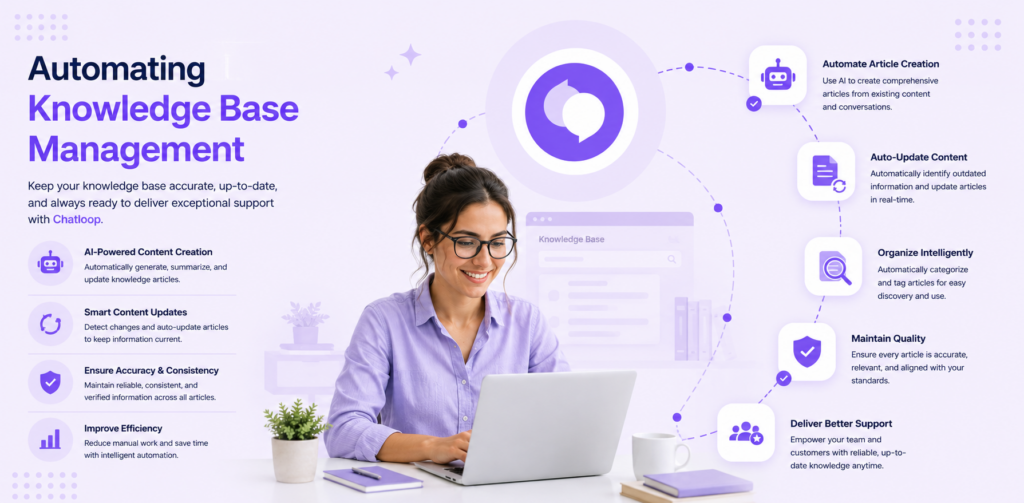
Customers increasingly prefer self-service to contacting support. Yet many knowledge bases are poorly organized, hard to search, outdated, or simply missing critical information. When customers can't find answers themselves, they turn to support—increasing ticket volume and support costs.
Automating knowledge base management changes this equation. By keeping knowledge bases current, optimizing for discoverability, and integrating them into customer workflows, companies reduce support volume 30-40% while actually improving customer satisfaction.
The Self-Service Opportunity
Why Self-Service Wins
Customers increasingly expect self-service options. 70% prefer self-service to speaking with a human when possible. For simple questions (password reset, billing information, status updates), self-service is actually preferred to support contact. When a good answer is available, customers often find it before contacting support.
The Current Problem
Most knowledge bases fail because:
- Content gets outdated quickly
- Poorly organized or hard to search
- Low discoverability (customers don't know it exists)
- Not integrated into customer workflow
- Quality inconsistent
Result: Customers don't know the knowledge base exists, can't find answers even if they try, or get incorrect information. They turn to support instead.
How Automated Knowledge Base Management Works
Content Automation
AI identifies support questions being asked repeatedly. It automatically creates documentation drafts based on best answers. When processes change, AI updates documentation automatically rather than waiting for manual updates.
Discoverability Optimization
AI optimizes knowledge base for search visibility both internally and externally. It identifies gaps: "We get 20 questions about X but have no documentation." It suggests new content. It ensures frequently asked questions are easy to find.
Quality Assurance
AI monitors knowledge base for accuracy. It flags outdated content. It identifies conflicting information. It ensures consistency across articles.
Integration
Automated knowledge base is embedded in help chat, chatbots, email responses, and customer portals. When customer asks question, AI first searches knowledge base. If good answer exists, customer gets self-service solution.
Measurement
System tracks: how many customers used self-service, how many found answer helpful, how many went on to contact support anyway. This data drives knowledge base improvement.
Implementation Strategy
Phase 1: Audit (Week 1)
Document what knowledge you currently have. Identify gaps: what questions do you get that you don't have answers for? Assess current documentation quality. Identify outdated content.
Phase 2: Organization (Week 2-3)
Reorganize documentation around customer questions rather than internal structure. Create category hierarchy that mirrors how customers think. Write for customer language, not technical jargon.
Phase 3: Automation Setup (Week 4)
Choose or build automation to keep knowledge base current. Set up analytics to track performance. Integrate into support channels. Configure AI to suggest knowledge base articles.
Phase 4: Soft Launch (Week 5)
Publish knowledge base. Share with customers. Monitor what they search for. Track what helps and what doesn't.
Phase 5: Optimization (Week 6+)
Continuously improve based on search behavior and feedback. Remove unhelpful articles. Improve top articles. Add missing content. Update outdated material.
Real-World Results
Case Study 1: SaaS Platform (10,000 users)
Before: 2,000 support tickets/month. Knowledge base had 50 articles, not well organized, outdated.
After: Invested in knowledge base management system. Grew to 200 articles. Optimized for search. Integrated into chat bot.
Results:
- Self-service usage: 35% of customers use before contacting support
- Support volume: 2,000 → 1,200 (-40%)
- Cost savings: $6,000/month
- Customer satisfaction: Improved (customers prefer self-service for simple questions)
Case Study 2: E-Commerce (100,000 customers)
Before: No knowledge base. All questions went to support.
After: Built comprehensive knowledge base. Automated content creation from support conversations. Integrated into product.
Results:
- Customer self-service usage: 45% of customers find answers in knowledge base
- Support volume: Decreased 35%
- Cost savings: $25,000/month
- Faster resolution: Customers get answers instantly instead of waiting for support
Case Study 3: Technical Product
Before: Technical documentation existed but was hard to search. Customers couldn't find answers.
After: Reorganized documentation around customer questions. Added AI-powered search. Embedded in product.
Results:
- Customer discovery: 60% know knowledge base exists
- Usage: 50% of customers use before contacting support
- Support tickets: Decreased 45%
- Support satisfaction: Increased (team handles complex issues, not basic questions)
Best Practices
1. Write for Your Customers
Technical documentation often uses jargon customers don't understand. Write in customer language. Include common variations of questions. Add visuals—screenshots, videos help understanding.
2. Organize Around Customer Questions
Organize by "How do I...?" rather than by product component. "How do I reset my password?" not "User Management Settings."
3. Keep Content Current
Assign owners to documentation. Schedule regular reviews. Automate updates where possible. Remove outdated content.
4. Make It Discoverable
Ensure customers know knowledge base exists. Link from help email signature. Embed in chat. Add search to product. Make it easy to find.
5. Measure What Works
Track which articles get read, which help customers (low support volume after reading), which don't help (high support volume). Double down on what works.
Metrics That Matter
| Metric | Target | Impact |
|---|---|---|
| Knowledge Base Usage | >40% of customers | Reduce tickets |
| Self-Service Resolution | >70% of questions answered | Reduce support volume |
| Average Time to Answer | <2 minutes | Customer satisfaction |
| Article Quality Score | >8/10 rating | Reduce escalation |
| Discoverability | >70% know KB exists | Increase usage |
Getting Started
Week 1: Audit
- Identify top 50 customer questions
- Assess current documentation
- Identify major gaps
Week 2-3: Build
- Write 20-30 foundational articles
- Organize logically
- Optimize for search
Week 4: Deploy
- Launch knowledge base
- Share with customers
- Integrate into support
Week 5+: Optimize
- Track usage
- Improve based on data
- Continuously add content
Conclusion
Customers increasingly prefer self-service. Knowledge base automation makes that possible by keeping documentation current, discoverable, and integrated. Companies implementing these practices reduce support volume 30-40% while improving customer satisfaction—customers get faster answers through self-service than waiting for support.
The result is a virtuous cycle: fewer support tickets, happier customers, lower costs, and more time for support team to handle complex issues.
Next Steps
- Audit your top 50 customer questions
- Assess current knowledge base
- Plan content organization
- Write foundational articles
- Launch and measure
Ready to scale self-service? Start with your top 20 customer questions and build from there.




9 Responses on this post
Comments are closed.